

Integrasikan lokalisasi tingkat perusahaan tanpa membebani database.
Plugin terjemahan WordPress tradisional sering kali memperlambat situs dengan menduplikasi setiap postingan dan halaman di database Anda. MultiLipi menggunakan pendekatan yang berbeda. Plugin WordPress khusus kami bertindak sebagai Konektor APIyang ringan, menghubungkan situs Anda ke Cloud Terjemahan Neuralkami. Ini memastikan situs Anda tetap cepat sekaligus menghadirkan konten yang dioptimalkan untuk SEO dalam 120+ bahasa.
Panduan ini menjelaskan secara rinci proses instalasi dan autentikasi menggunakan plugin MultiLipi Translate resmi.
1. Prasyarat Penerapan
Sebelum memulai instalasi, pastikan Anda memiliki:
Akses Admin
Anda harus memiliki izin untuk menginstal dan mengaktifkan plugin (peran administrator).
Kunci API MultiLipi
Temukan ini di Dasbor Anda di bawah Pengaturan > Umum.
2. Langkah 1: Instal Modul Konektor
Plugin di-host di repositori resmi WordPress untuk keamanan dan kemudahan pembaruan.
- 1
Masuk ke Dasbor Admin WordPress.
- 2
Arahkan ke Plugins > Add New di bilah sisi kiri.
- 3
Cari: Ketik "MultiLipi Translate" di bilah pencarian.
- 4
Instal: Klik Instal Sekarang pada plugin resmi MultiLipi.
- 5
Aktifkan: Klik Aktifkan untuk menginisialisasi modul.
Tindakan Sistem
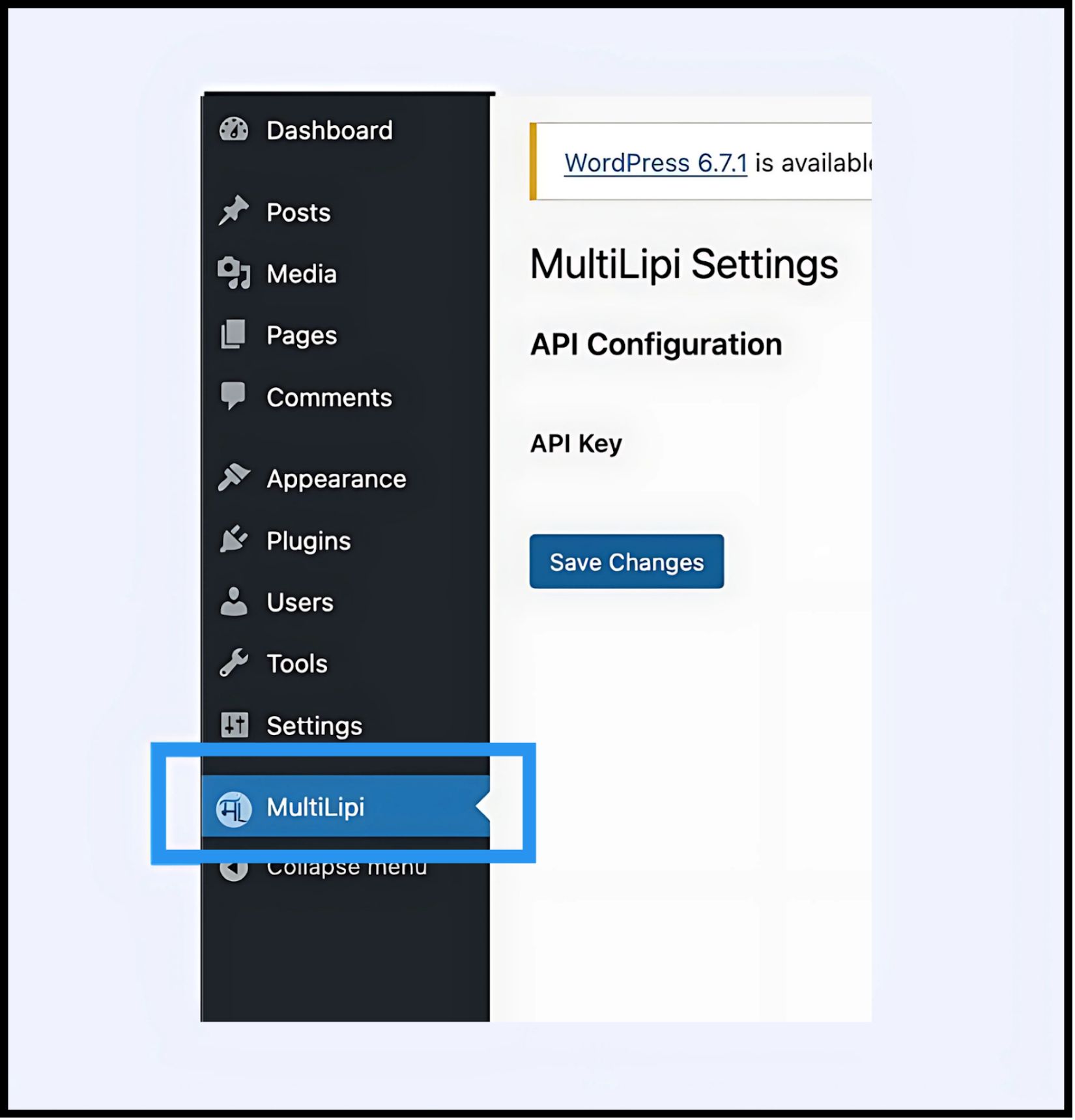
Item menu baru bertuliskan MultiLipi akan muncul di bawah menu utama Anda Pengaturan tab.
3. Langkah 2: Buat Jabat Tangan API
Anda harus mengautentikasi plugin untuk menghubungkan situs Anda ke proyek MultiLipi Anda.
- 1
Arahkan ke Settings > MultiLipi.
- 2
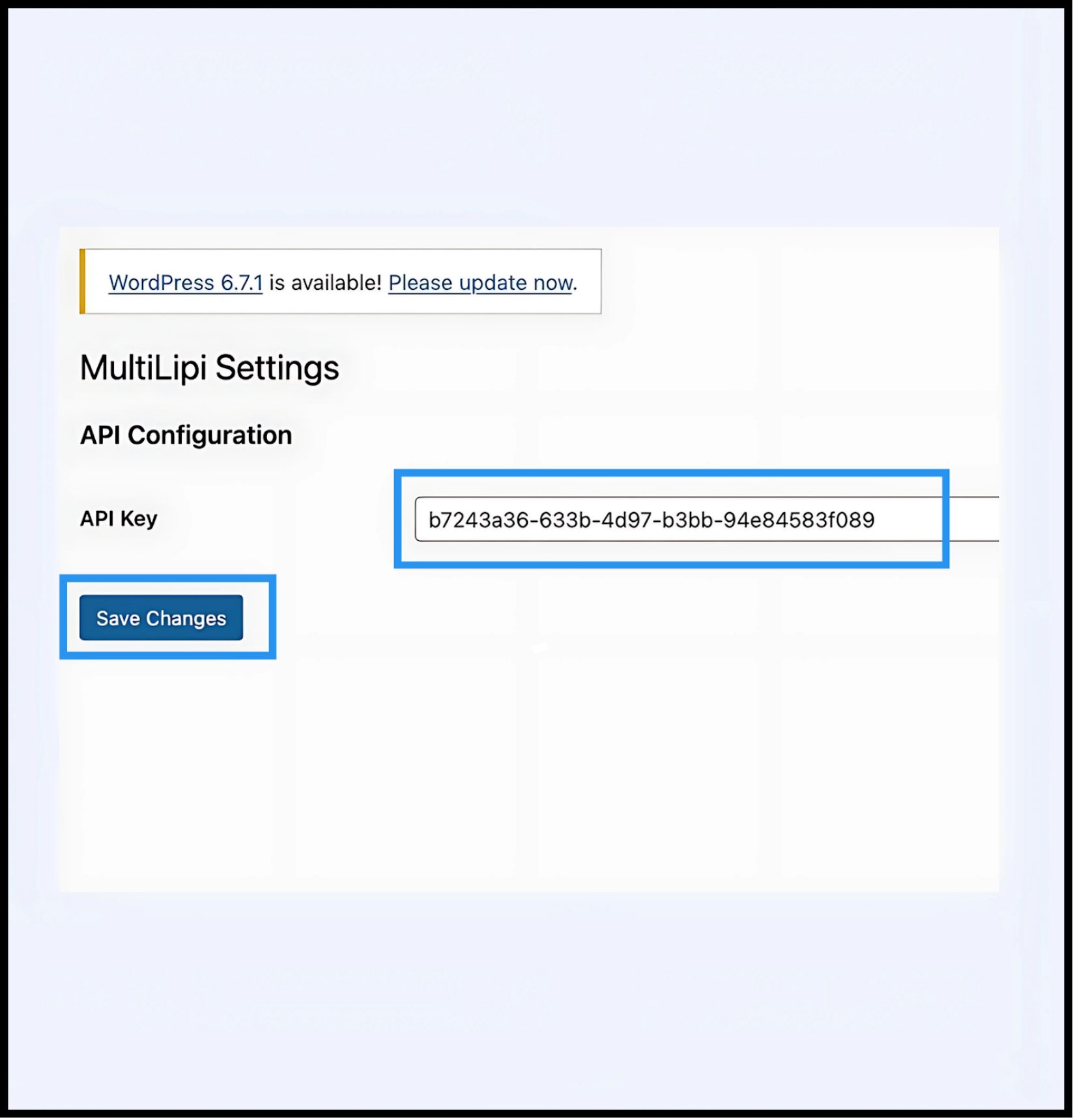
Konfigurasi API: Temukan API Key kolom.
- 3
Autentikasi: Tempel Kunci API Proyek unik Anda (yang disalin dari Dasbor MultiLipi Anda).
- 4
Komit: Klik Simpan Perubahan.
Hasil
Plugin memvalidasi kunci dan membuat koneksi aman ke mesin terjemahan.
4. Langkah 3: Verifikasi Edge
Setelah diautentikasi, lapisan terjemahan aktif segera.
Muat Ulang
Kunjungi situs web Anda yang menghadap publik.
Pemeriksaan Visual
Pengalih Bahasa seharusnya muncul di sudut kiri bawah (posisi default).
Uji Fungsional
Alihkan bahasa dan verifikasi bahwa konten diterjemahkan secara instan.
Protokol Pemecahan Masalah
- •Pembersihan Cache: Jika Anda menggunakan plugin caching (WP Rocket, W3 Total Cache) atau caching sisi server (Varnish, Nginx), Anda harus membersihkan cache Anda setelah instalasi agar pengalih muncul.
- •Pemeriksaan Konflik: Pastikan tidak ada plugin terjemahan lain (seperti WPML atau Polylang) yang aktif di halaman yang sama, karena dapat berkonflik dengan injeksi DOM.
5. Manajemen Pasca-Penyebaran
Dengan plugin aktif, situs WordPress Anda kini tersinkronisasi dengan infrastruktur kami.
Glosarium & SEO
Anda tidak perlu mengelola terjemahan di dalam WordPress. Masuk ke Dasbor MultiLipi Anda untuk mendefinisikan Aturan Glosarium, mengonfigurasi Tag Hreflang, dan mengelola URL yang Diterjemahkan.
Visual Overrides
Gunakan Editor Visual di dasbor MultiLipi untuk memperbaiki masalah tata letak apa pun yang disebabkan oleh perluasan teks (misalnya, dalam bahasa Jerman atau Rusia).
Pembaruan
Semua pengeditan terjemahan yang dibuat di cloud MultiLipi tercermin secara instan di situs WordPress Anda tanpa perlu memperbarui plugin atau membersihkan cache lagi.