
Terjemahan sering merusak desain. Kata-kata bahasa Jerman 30% lebih panjang dari bahasa Inggris; Bahasa Arab membalik tata letak dari Kanan ke Kiri. Editor Visual MultiLipi menyediakan lingkungan WYSIWYG, real-time di mana Anda dapat menyempurnakan konten, menyesuaikan gaya, dan memperbaiki masalah tata letak langsung pada tampilan langsung situs web Anda.
Antarmuka ini menggabungkan Saran Konten Neural dengan Kontrol CSS/Font, memungkinkan Anda melindungi identitas visual merek Anda di setiap perangkat.
Tantangan Tata Letak
Tombol bahasa Inggris yang dirancang dengan sempurna bertuliskan "Buy Now" mungkin meluap dan merusak tata letak Anda saat diterjemahkan ke bahasa Jerman sebagai "Jetzt Kaufen" atau bahasa Finlandia sebagai "Osta Nyt". Editor Visual memungkinkan Anda mendeteksi dan memperbaiki masalah ini sebelum pelanggan Anda melihatnya.
1. Meluncurkan Antarmuka
Untuk memulai audit visual halaman yang dilokalkan Anda:
Akses Proyek
Akses Dasbor MultiLipi Anda dan pilih proyek aktif Anda.
Temukan Halaman Target
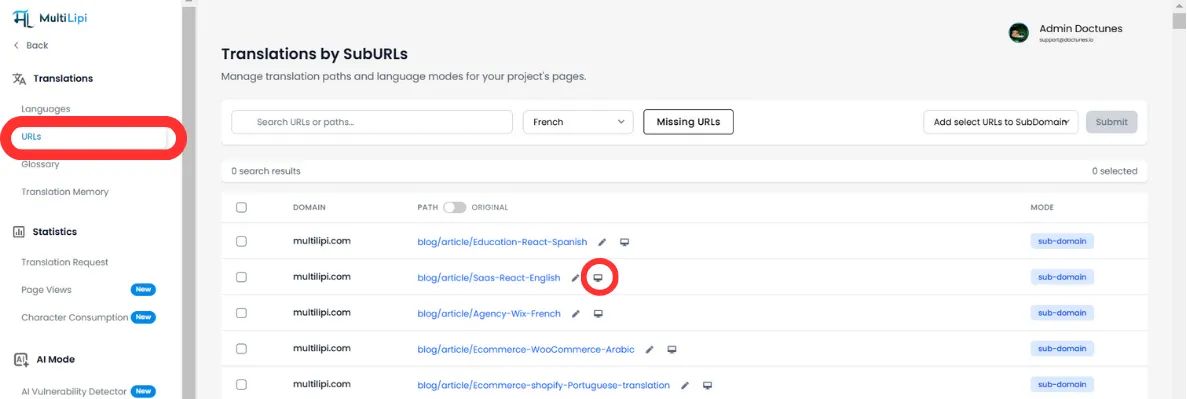
Buka Terjemahan > URL. Ini menampilkan daftar semua jalur terindeks (misalnya, /pricing, /tentang).
Inisialisasi Editor
Klik Ikon Editor Visual (🖌️/🖥️) di sebelah URL spesifik yang ingin Anda periksa.
📌 Catatan: Editor memuat proxy langsung situs Anda. Anda dapat menavigasi melalui tautan seperti pengguna sungguhan untuk menemukan konten yang ditautkan secara mendalam.
2. Kemampuan Inti
A. Penyuntingan Teks Sadar Konteks
Jangan mengedit di spreadsheet; edit di tempat pengguna melihatnya.
Manipulasi Langsung
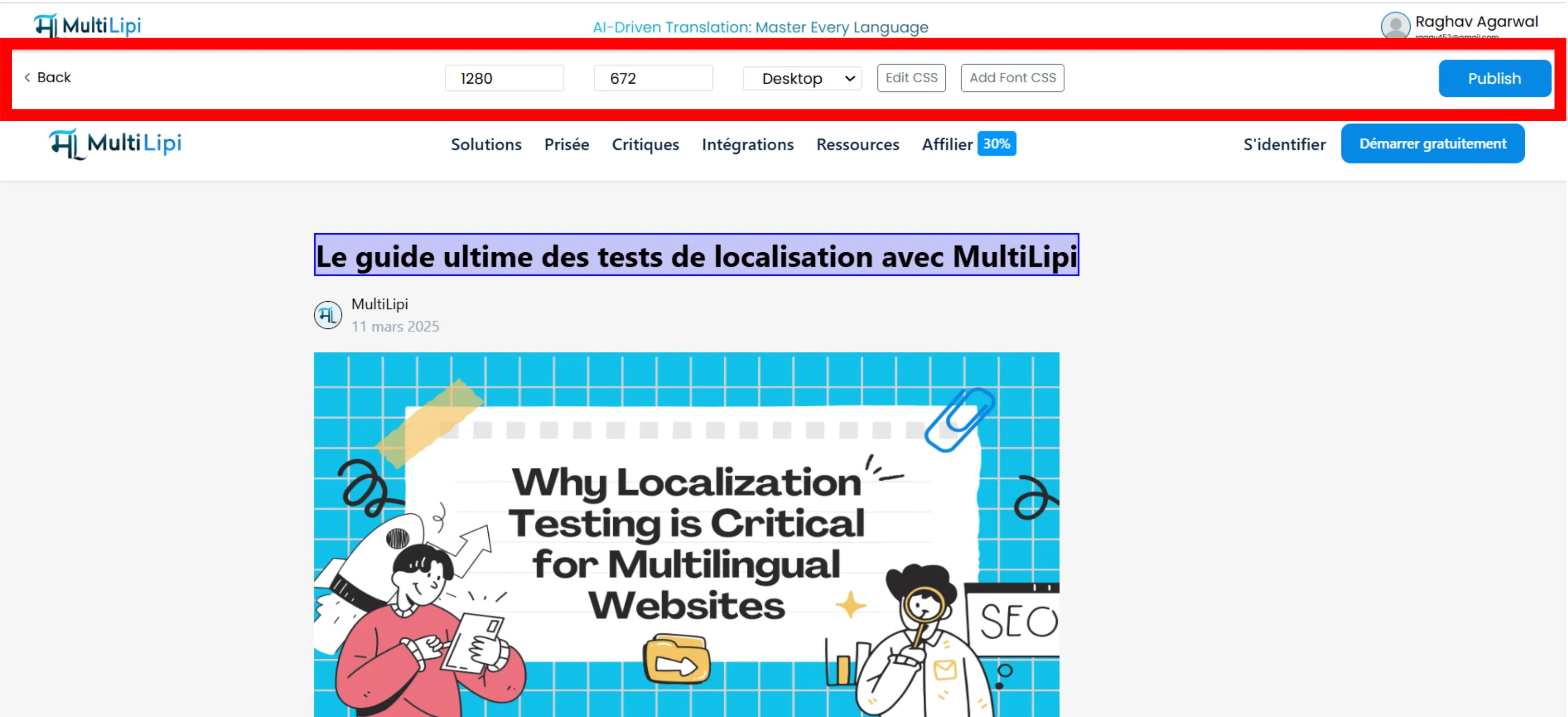
Klik judul, paragraf, atau tombol apa pun untuk mengetik langsung di halaman.
Saran Neural
Saat Anda memilih teks, mesin AI kami menganalisis elemen dan menawarkan Penulisan Ulang Cerdas dioptimalkan untuk ruang dan nada tertentu.
Ganti Satu Klik
Terima saran AI secara instan atau masukkan istilah yang telah disetujui sebelumnya dari Glosarium Anda tanpa mengetik manual.
B. Lokalisasi Media & SEO
Gambar membawa konteks. Lokalkan untuk meningkatkan relevansi.
Tag Alt Gambar
Klik gambar mana pun untuk mengedit alt atribut. Menerjemahkan ini memastikan gambar Anda mendapat peringkat dalam penelusuran Gambar Google lokal.
"Sepatu Lari""Chaussures de sport"C. Pengesampingan Sistem Desain (CSS & Font)
Bahasa yang berbeda memerlukan perlakuan visual yang berbeda.
CSS Kustom
Klik "Edit CSS" untuk menyuntikkan gaya hanya untuk bahasa tertentu yang Anda edit.
Studi Kasus:
Kurangi ukuran font tombol dalam bahasa Jerman untuk mencegah luapan teks.
Kontrol Tipografi
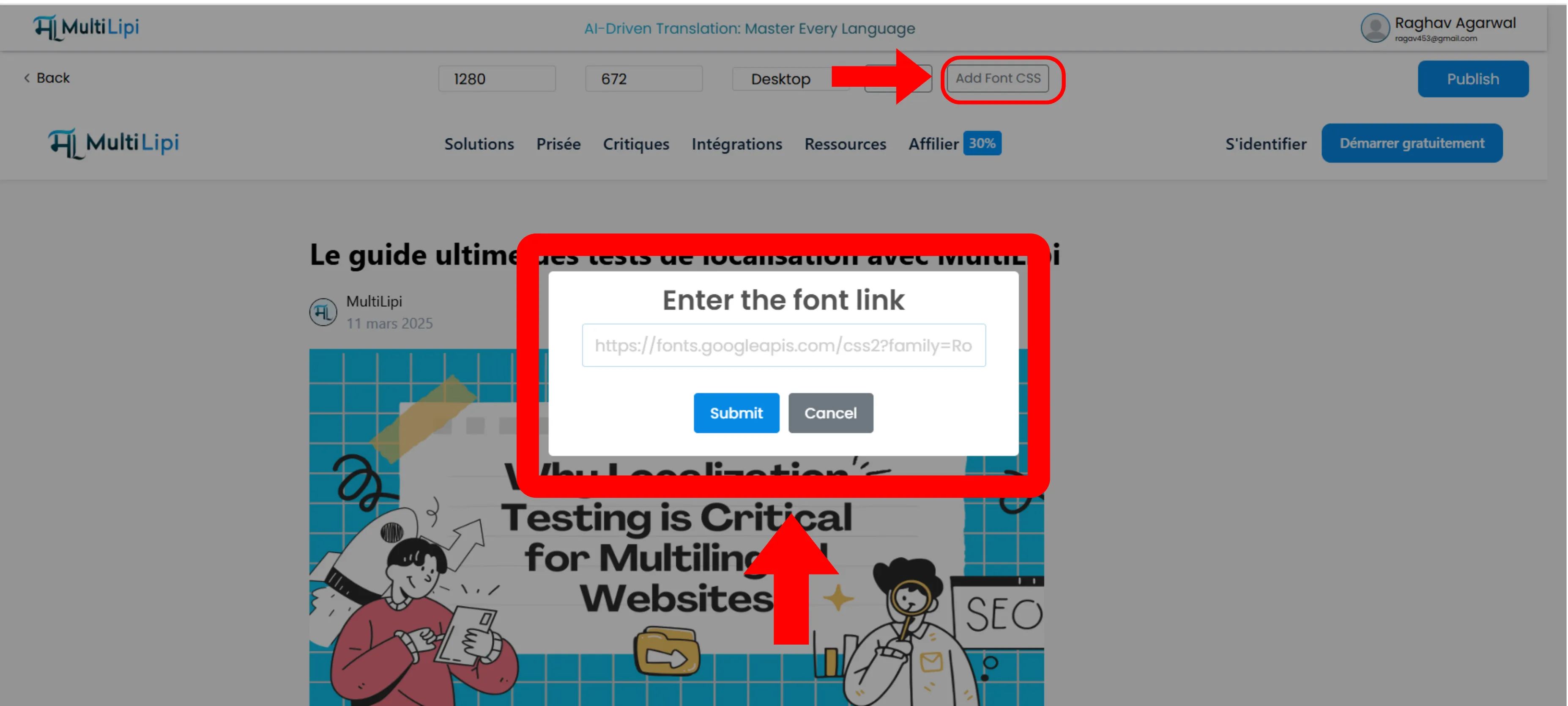
Gunakan "Tambahkan Google Fonts" untuk memuat font khusus wilayah.
💡 Tips Pro:
Muat font khusus seperti Noto Sans JP untuk halaman Jepang guna memastikan karakter ditampilkan dengan indah, alih-alih menggunakan font sistem generik.
D. Verifikasi Responsif
Situs Anda harus berfungsi di setiap ukuran layar.
Pengalihan Perangkat
Gunakan bilah alat atas untuk beralih antar Desktop, Tablet, dan Seluler tampilan.
Pemeriksaan Tata Letak
Pastikan terjemahan yang lebih panjang tidak mendorong tombol CTA penting "di bawah lipatan" pada perangkat seluler.
3. Penerapan
Propagasi Tepi Instan
Ketika Anda puas dengan kualitas visual dan linguistik:
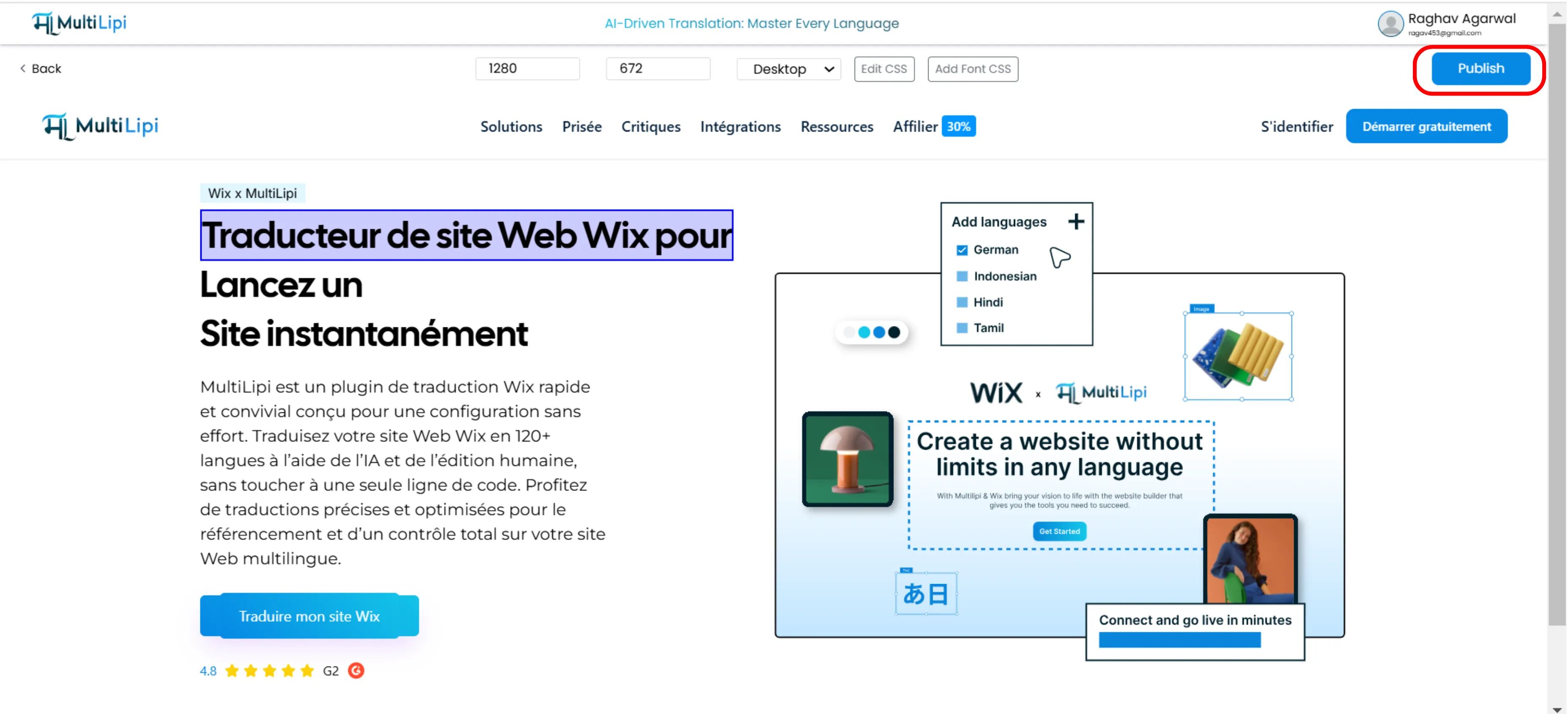
Klik Publikasikan di pojok kanan atas.
Perubahan langsung dikirim ke Jaringan Pengiriman Global (GDN).
Situs Anda yang tayang diperbarui segera untuk semua pengguna di seluruh dunia.
⚡ Tanpa Penundaan Cache: Berbeda dengan alur kerja CMS tradisional di mana Anda mungkin menunggu berjam-jam untuk invalidasi cache CDN, infrastruktur edge MultiLipi memastikan perubahan tersebar secara global dalam hitungan detik.
Ringkasan: Mengapa Menggunakan Pengeditan Visual?
| Fitur | Manfaat |
|---|---|
| Rendering Waktu Nyata | Lihat secara tepat bagaimana terjemahan memengaruhi tata letak Anda sebelum dipublikasikan. |
| Integritas Desain | Perbaiki tata letak "rusak" yang disebabkan oleh perluasan teks (misalnya, dalam bahasa Jerman atau Rusia). |
| Keterbacaan Skrip | Impor font kustom untuk skrip non-Latin (Arab, Cina) untuk tipografi profesional. |
| SEO Media | Lokalize atribut tersembunyi seperti Alt Tag untuk visibilitas pencarian maksimal. |
🎨 Desain Penting Secara Global: Editor Visual memastikan bahwa identitas visual merek Anda tetap utuh di lebih dari 120+ bahasa, mencegah kesalahan umum di mana situs yang diterjemahkan terlihat "rusak" atau tidak profesional dibandingkan dengan aslinya.