
Dalam infrastruktur global, pertama kedua kunjungan pengguna sangat penting. Jika pengguna Jerman mendarat di beranda berbahasa Inggris Anda, mereka akan mengalami hambatan. MultiLipi Pengalih Bahasa Pengunjung menghilangkan ini dengan bertindak sebagai pengontrol lalu lintas yang cerdas. Ia memeriksa header permintaan yang masuk dan segera mengalihkan pengunjung ke versi situs Anda yang terlokalisasi yang sesuai dengan preferensi peramban mereka.
Panduan ini merinci protokol konfigurasi dan algoritma perutean yang digunakan untuk mengelola aliran ini.
1. Arsitektur Deteksi
Bagaimana mesin mengetahui siapa yang berkunjung.
Pengalihan beroperasi pada aliran logika ketat berdasarkan Accept-Language header HTTP yang dikirim oleh setiap browser web modern.
Interogasi:
Seorang pengunjung mendarat di situsanda.com.
Analisis:
Mesin membaca daftar prioritas bahasa peramban (misalnya, fr-FR, en-US).
Pencocokan:
Ini memeriksa bahasa aktif proyek Anda.
Kesesuaian Ditemukan:
Pengguna segera dialihkan 302 ke /fr/.
Tidak Ada Kecocokan:
Pengguna tetap pada Bahasa Default (Sumber).
2. Protokol Konfigurasi
Aktifkan lapisan perutean otomatis ini langsung dari pengaturan proyek Anda.
Langkah 1: Akses Dasbor Proyek
Masuk ke Dasbor MultiLipi.
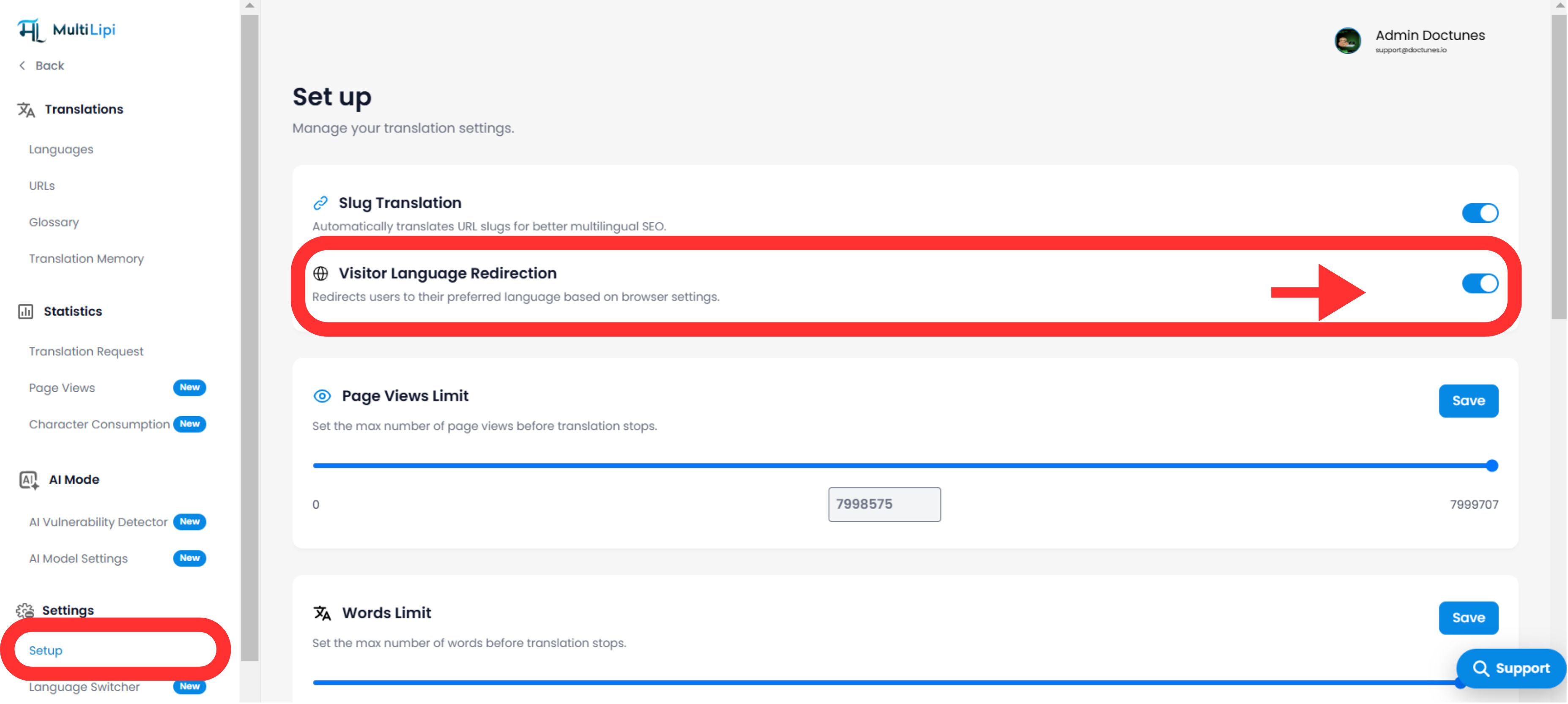
Langkah 2: Navigasi ke Pengaturan
- •Buka Pengaturan di bilah sisi kiri.
- •Pilih Pengaturan dari submenu.
Langkah 3: Aktifkan Modul
- •Gulir ke bawah untuk menemukan Pengalih Bahasa Pengunjung blok fitur.
- •Tindakan: Alihkan sakelar ke
NYALA. - •Status: Aktif: Mesin routing akan segera mulai memfilter dan mengalihkan lalu lintas baru.
Mesin Perutean Diaktifkan
3. Lapisan Persistensi (Penggantian Cookie)
Menyeimbangkan otomatisasi dengan kontrol pengguna.
Ketakutan umum dengan pengalihan otomatis adalah menjebak pengguna dalam bahasa yang salah (misalnya, orang Inggris di Paris menggunakan komputer berbahasa Prancis). MultiLipi mengatasinya dengan Cookie Prioritas.
Logika:
Jika pengguna dialihkan secara otomatis ke Bahasa Prancis tetapi secara manual menggunakan pengalih bahasa untuk kembali ke Bahasa Inggris, kami menetapkan Cookie Persistensi.
Hasilnya:
Pada kunjungan berikutnya, sistem menghormati pilihan manual mereka atas pengaturan peramban mereka. Pengguna selalu terkendali.
4. Harmoni SEO & Pengindeksan
Melindungi anggaran perayapan Anda.
Fitur ini direkayasa agar Ramah Mesin Pencari.
Kompatibilitas Hreflang:
Ini bekerja bersama dengan hreflang tag untuk memastikan Google memahami hubungan antara halaman Anda.
Perilaku Bot:
Sebagian besar bot pencarian merayapi tanpa Accept-Language header atau diperlakukan sebagai "Netral," memastikan mereka masih dapat mengakses dan mengindeks konten default Anda tanpa terjebak dalam putaran pengalihan.
5. Protokol Verifikasi
Cara menguji rute.
Untuk memverifikasi pengalihan berfungsi:
Konfigurasi Peramban:
Buka pengaturan peramban Anda (Chrome/Firefox) dan ubah bahasa pilihan Anda ke salah satu yang Anda dukung (misalnya, Prancis).
Hapus Kuki:
Buka jendela Incognito/Private (untuk melewati Cookie Persistensi yang disebutkan di bagian 3).
Kunjungi:
Ketik URL utama Anda (situsanda.com).
Amati:
Anda seharusnya secara otomatis diarahkan ke situsanda.com/fr/.
Indikator Keberhasilan:
Jika URL di peramban Anda berubah untuk menyertakan kode bahasa target Anda (misalnya, /fr/), Pengalihan Bahasa Pengunjung adalah bekerja dengan sempurna.