

Lokalize permalink Anda untuk visibilitas organik dan CTR maksimum.
Di SEO Internasional, struktur URL Anda adalah sinyal pertama yang dilihat pengguna dalam hasil pencarian. Jika konten Anda dalam bahasa Spanyol tetapi URL Anda tetap dalam bahasa Inggris (misalnya, /es/pricing), Anda menciptakan "Ketidakcocokan Bahasa" yang menurunkan kepercayaan dan Tingkat Klik-Tayang (CTR).
MultiLipi Mesin Terjemahan Slug menghilangkan gesekan ini. Mesin ini secara otomatis menerjemahkan segmen jalur URL Anda (slug) ke dalam bahasa target, memastikan arsitektur routing Anda cocok dengan konten Anda.
- Bahasa Inggris:
example.com/pricing - Bahasa Spanyol:
example.com/es/precios - Jerman:
example.com/de/preise
1. Keunggulan SEO
Mengapa melokalkan lapisan routing Anda?
Relevansi Kata Kunci
Mesin pencari menyorot kata kunci di URL. Menerjemahkan slug menempatkan kata kunci target Anda (misalnya, "precios") langsung di tautan, meningkatkan peringkat untuk kueri lokal.
Kelancaran Kognitif
URL yang sepenuhnya terlokalisasi terasa asli. Ini memberi sinyal kepada pengguna, "Halaman ini sebenarnya untuk saya," bukan "Ini hanyalah salinan yang diterjemahkan secara otomatis."
Konsistensi Struktur
Ini menyelaraskan remah roti dan arsitektur situs Anda, menciptakan hierarki logis untuk crawler.
2. Protokol Konfigurasi
Mengaktifkan mesin perutean.
Untuk mengaktifkan terjemahan jalur otomatis, ikuti langkah-langkah ini di pusat komando Anda:
Akses Konteks Proyek
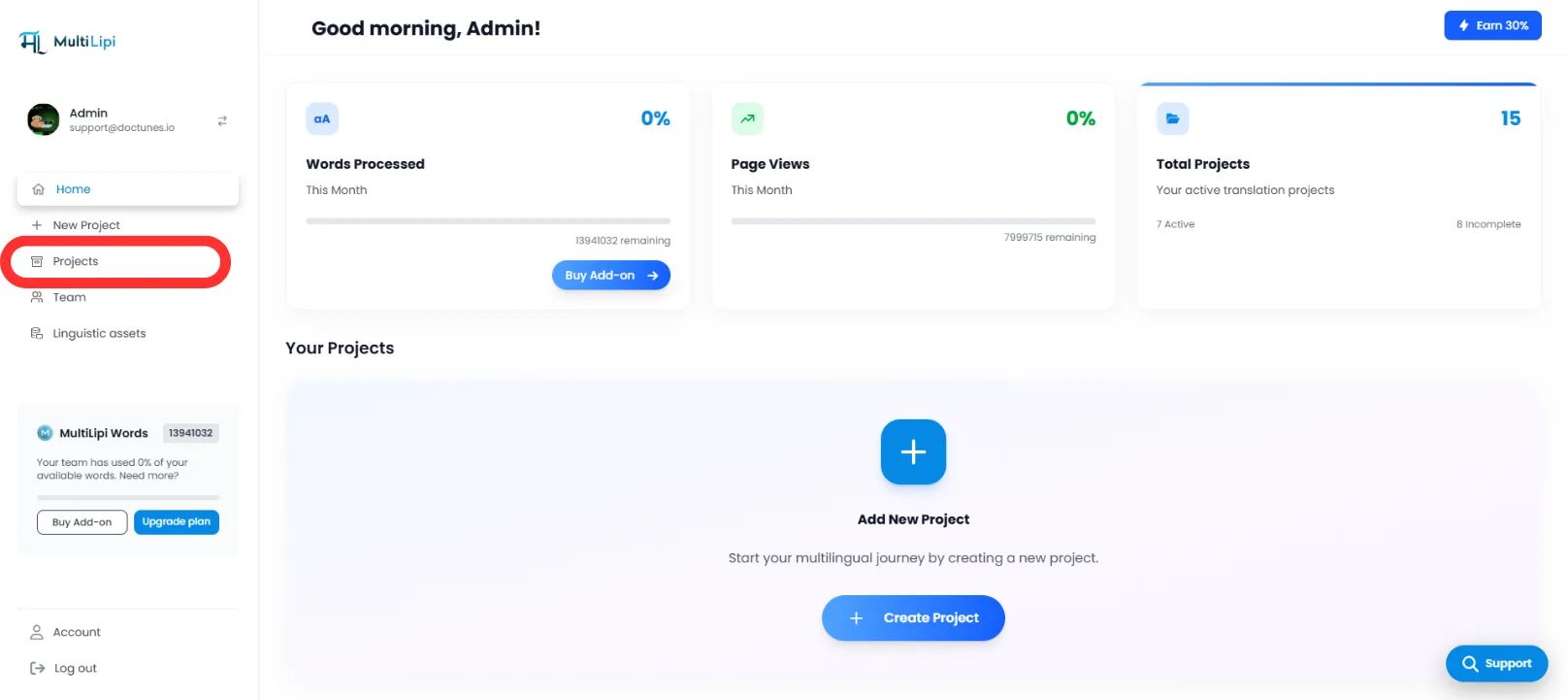
- Masuk ke Dasbor MultiLipi.
- Arahkan ke Proyek di bilah sisi kiri untuk melihat integrasi aktif Anda.
Pilih Arsitektur Target
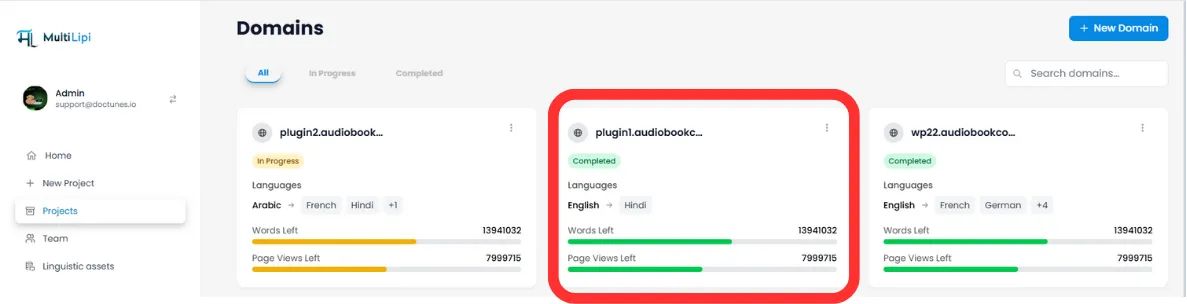
- Temukan proyek/situs web spesifik yang ingin Anda konfigurasikan.
- Klik Tab Proyek yang Diinginkan untuk masuk ke pengaturannya.
Akses Pengaturan
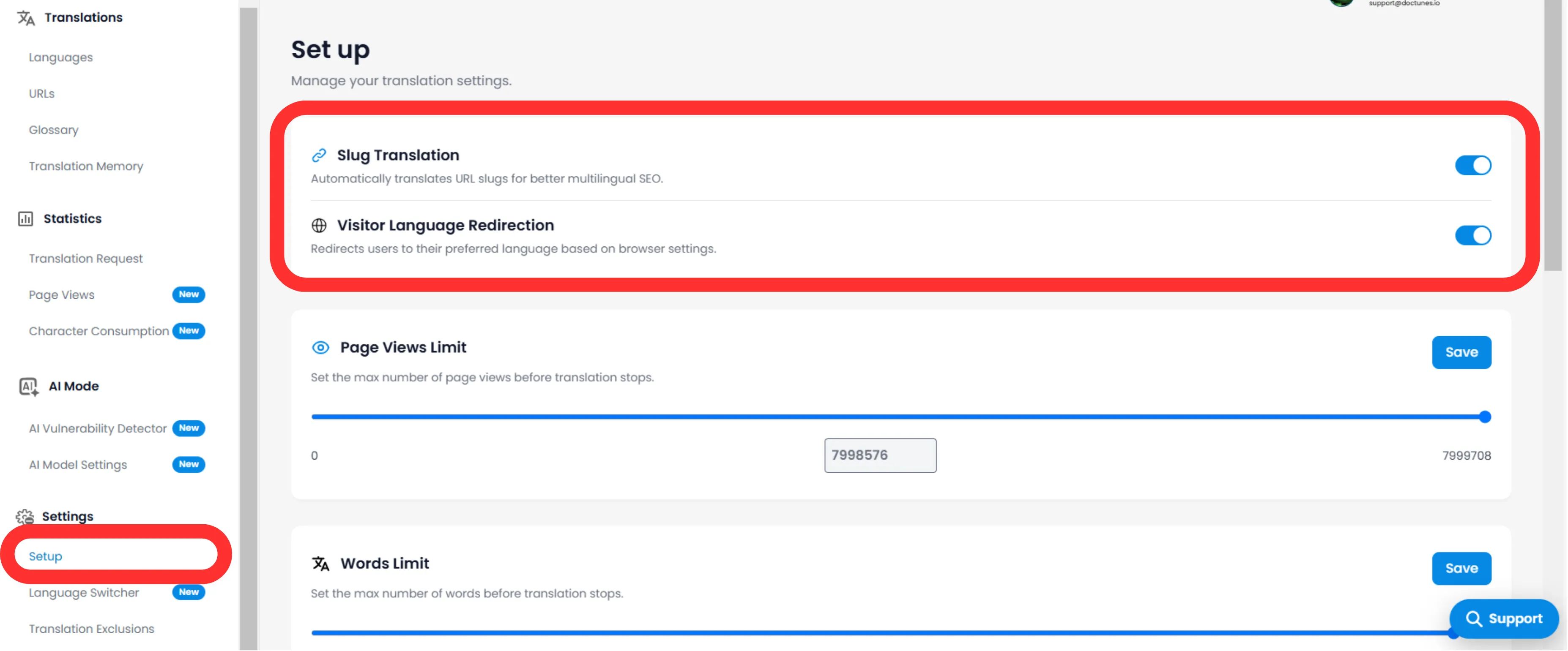
- Di sub-menu proyek (sisi kiri), klik Pengaturan.
- Pilih Pengaturan.
Alihkan Mesin Slug
- Gulir ke Terjemahan Slug bagian.
- Tindakan: Alihkan pengalih ke AKTIF (Biru).
- Tindakan Sistem: Mesin sekarang akan mencegat permintaan URL dan menyajikan slug yang dilokalkan untuk semua bahasa target.
3. Perilaku Teknis
Cara penanganan pengalihan.
Setelah diaktifkan, sistem mengelola pemetaan secara otomatis.
Pengalihan 301
Jika pengguna (atau bot) mencoba mengakses URL lama yang tidak diterjemahkan (/es/pricing), MultiLipi secara otomatis mengalihkan mereka 301 ke URL yang dioptimalkan baru (/es/precios). Ini mempertahankan ekuitas tautan Anda (jus SEO).
Injeksi Peta Situs
Peta situs XML Anda akan diperbarui secara otomatis untuk mencantumkan URL baru yang terlokalkan ini agar dapat dirayapi oleh Googlebot.
🌐 Lokalisasi URL Otomatis: Dengan menerjemahkan slug URL Anda, Anda menciptakan pengalaman internasional yang mulus yang meningkatkan peringkat SEO dan kepercayaan pengguna di semua pasar target.