
Pelokalan sejati melampaui isi halaman; Ini termasuk Struktur URL itu sendiri . "Terjemahan Slug" mengonversi jalur semantik tautan Anda (misalnya, /tentang-kami ) ke dalam bahasa target (misalnya, /a-propos atau /sobre-nosotros ). Ini sangat penting untuk SEO Multibahasa , karena mesin telusur memprioritaskan URL yang cocok dengan maksud penelusuran pengguna dalam bahasa ibunya.
Panduan ini merinci protokol konfigurasi , manajemen tabrakan, dan logika perutean untuk pelokalan URL mendalam.
1. Protokol Pemberdayaan
Aktifkan pelokalan mendalam.
Secara default, MultiLipi mencoba menerjemahkan slug untuk memaksimalkan SEO. Namun, Anda harus Verifikasi konfigurasi ini di pengaturan proyek Anda.
Langkah 1: Akses Pengaturan Proyek
- • Masuk ke Dasbor MultiLipi .
- • Navigasikan ke Pengaturan di bilah sisi kiri.
- • Pilih Setup dari sub-menu.
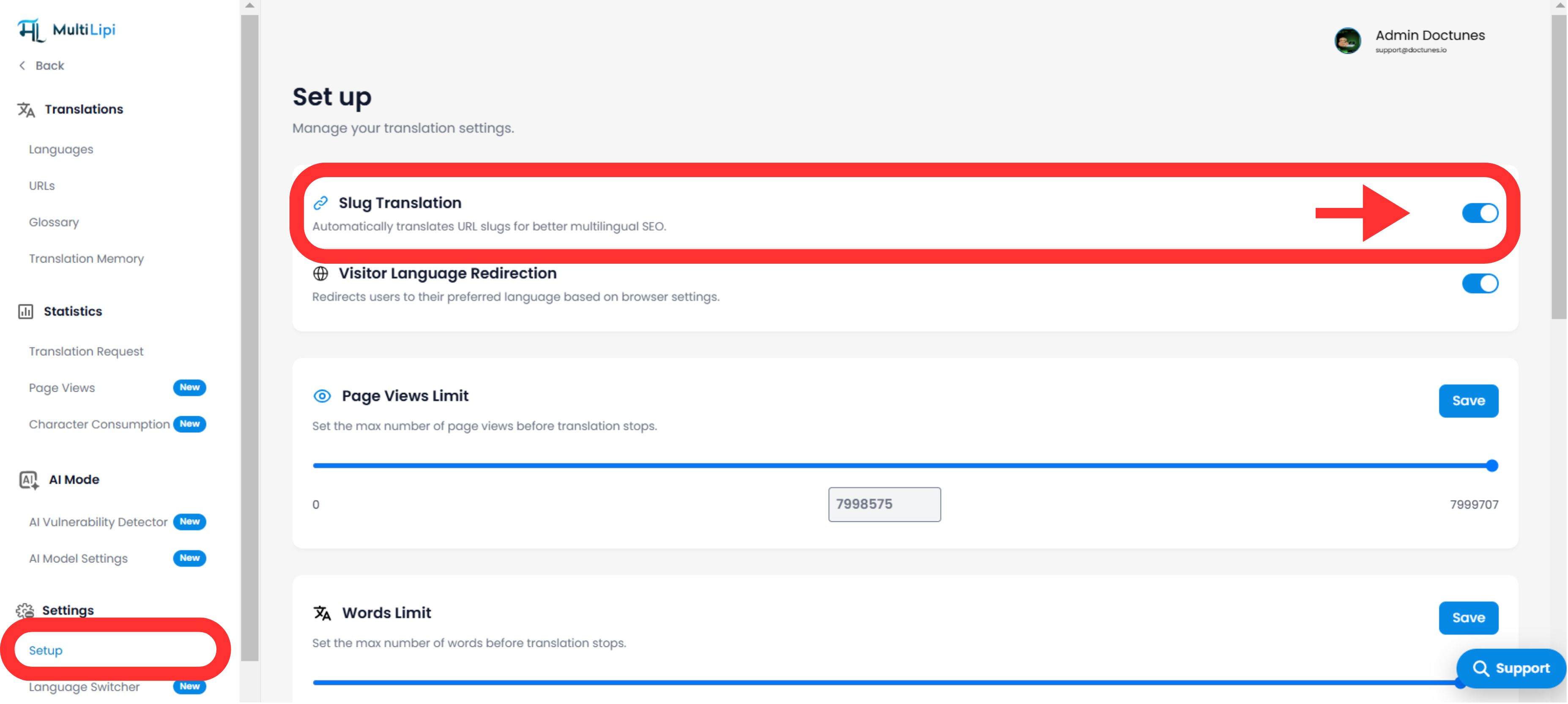
Langkah 2: Aktifkan Modul
- • Gulir ke bawah ke Terjemahan Siput bagian.
- • Tindakan: Pastikan sakelar dialihkan ke
Di atas(Posisi biru).
Mesin akan secara otomatis menghasilkan URL yang dilokalkan untuk semua halaman baru dan yang sudah ada (misalnya, /kontak → /contact ).
URL akan tetap dalam bahasa Inggris, bahkan di halaman yang diterjemahkan (misalnya, /es/kontak ).
2. Pembaruan Topologi Otomatis (Penulisan Ulang Tautan)
Bagaimana sistem menangani navigasi internal.
Salah satu fitur paling kuat dari mesin Terjemahan Slug adalah Penulisan Ulang Tautan Otomatis .
Mekanismenya:
Ketika siput diterjemahkan (misalnya, /shop → /boutique), MultiLipi memindai halaman lokal Anda untuk mencari tautan internal yang mengarah ke URL lama.
Tindakan:
Ini secara otomatis menulis ulang <a href="..."> tag dalam HTML untuk menunjuk ke slug baru yang dilokalkan.</a>
Hasilnya:
Pengguna tetap berada dalam ekosistem yang dilokalkan. Pengguna Prancis yang mengklik "Toko" akan dibawa ke /boutique, bukan kembali ke /shop.
3. Manajemen: Penggantian Manual
Kontrol presisi untuk kata kunci URL.
Meskipun AI kami menghasilkan slug yang ramah SEO secara otomatis, Anda mungkin ingin menyempurnakan URL secara manual untuk menargetkan kata kunci lokal tertentu atau mencocokkan kampanye pemasaran.
- • Arahkan ke Terjemahan bagian dasbor Anda.
- • Temukan baris halaman tertentu yang ingin Anda ubah.
- • Klik Edit Siput di samping pratinjau URL.
- • Masukan: Ketik string pilihan Anda (misalnya, ubah
/produkke/butik). - • Melakukan: Klik
Simpan Perubahan.
Nota: Sistem akan segera memperbarui peta perutean internal untuk menyajikan konten di alamat baru ini.
4. Protokol Manajemen Tabrakan
Mencegah konflik perutean.
Dalam beberapa bahasa, dua kata bahasa Inggris yang berbeda dapat diterjemahkan ke kata asing yang sama, menciptakan Tabrakan Siput .
Skenario:
Anda memiliki /toko (ritel) dan /toko (kata kerja). Keduanya mungkin menerjemahkan secara otomatis ke /butik dalam bahasa Prancis.
Risiko:
URL duplikat membingungkan mesin pencari dan menyebabkan kesalahan perutean.
Perbaikannya:
Gunakan Penggantian Manual (Langkah 3) untuk membedakannya (misalnya, pertahankan /butik untuk toko dan penggunaan /membeli untuk kata kerja).
5. Strategi Pengalihan Warisan (301s)
Menangani perubahan pada URL aktif.
Jika Anda memutuskan untuk mengubah slug yang diterjemahkan setelah Google mengindeksnya (misalnya, mengubah /fr/a-propos ke /fr/notre-histoire ), Anda harus memastikan pengguna tidak mengalami kesalahan 404.
Praktik Terbaik:
Menyiapkan 301 Pengalihan di CMS yang mendasarinya Anda (WordPress/Shopify/Webflow).
Alur kerja:
Mengalihkan pola URL terjemahan lama ke pola URL terjemahan baru untuk mempertahankan SEO Anda "jus tautan."
6. Integrasi CMS Universal
Perutean platform-agnostik.
Karena MultiLipi beroperasi sebagai lapisan proxy , terjemahan slug bekerja secara independen dari backend Anda.
Platform yang Didukung:
WordPress, Shopify, Webflow, Wix, Squarespace, dan HTML Kustom .
Tidak Ada Konfigurasi Backend:
Anda tidak perlu membuat halaman ini di CMS Anda. MultiLipi peta virtual permintaan /fr/butik ke asli Anda /toko saat menyajikan konten yang diterjemahkan.