

Lalu lintas global tidak dapat diprediksi. Unggahan viral atau perayapan bot dapat melonjakkan tampilan halaman Anda, yang berpotensi menghabiskan kuota bulanan Anda lebih cepat dari perkiraan. MultiLipi menyediakan Batas Penggunaan yang Dapat Disesuaikan (Pemutus Arus) yang memungkinkan Anda menentukan batas ketat untuk Tampilan Halaman dan Jumlah Kata. Ini bertindak sebagai katup pengaman, memastikan Anda tidak pernah melebihi anggaran yang dialokasikan atau batas paket tanpa persetujuan manual.
Panduan ini merinci protokol untuk mengonfigurasi ambang batas tata kelola ini.
1. Mekanisme Tata Kelola
Memahami kedua jenis batas.
A. Batas Tampilan Halaman (Pemutus Lalu Lintas)
Fungsi: Menetapkan jumlah maksimum pemuatan halaman terjemahan yang akan disajikan oleh situs Anda.
Peristiwa Pemicu: Jika Anda mengatur ini ke 50.000 dan lalu lintas Anda mencapai 50.001:
Tindakan: MultiLipi menghentikan sementara penyajian versi terjemahan dari situs Anda.
Pengalaman Pengguna: Pengunjung akan melihat versi bahasa default (asli) hingga batas direset atau siklus penagihan diperbarui.
Tujuan: Mencegah Biaya Kelebihan pada paket terukur.
B. Batas Kata (Pemutus Generasi)
Fungsi: Menetapkan jumlah maksimum kata sumber yang diizinkan untuk diterjemahkan oleh Mesin Neural.
Peristiwa Pemicu: Jika Anda mengatur ini ke 10.000 kata:
Tindakan: Sistem akan berhenti menerjemahkan konten baru.
Status: Terjemahan yang ada tetap aktif dan terlihat. Hanya teks baru yang muncul di situs Anda yang akan tetap dalam bahasa sumber.
Tujuan: Mencegah arsip blog yang besar atau konten buatan pengguna menguras kuota terjemahan Anda seketika.
2. Protokol Konfigurasi
Kelola ambang batas ini secara langsung dari pusat kendali proyek Anda.
Langkah 1: Akses Pengaturan
- •Masuk ke Dasbor MultiLipi Anda.
- •Navigasikan ke Pengaturan di bilah sisi kiri.
- •Pilih Pengaturan Proyek dari sub-menu.
Langkah 2: Tentukan Ambang Batas
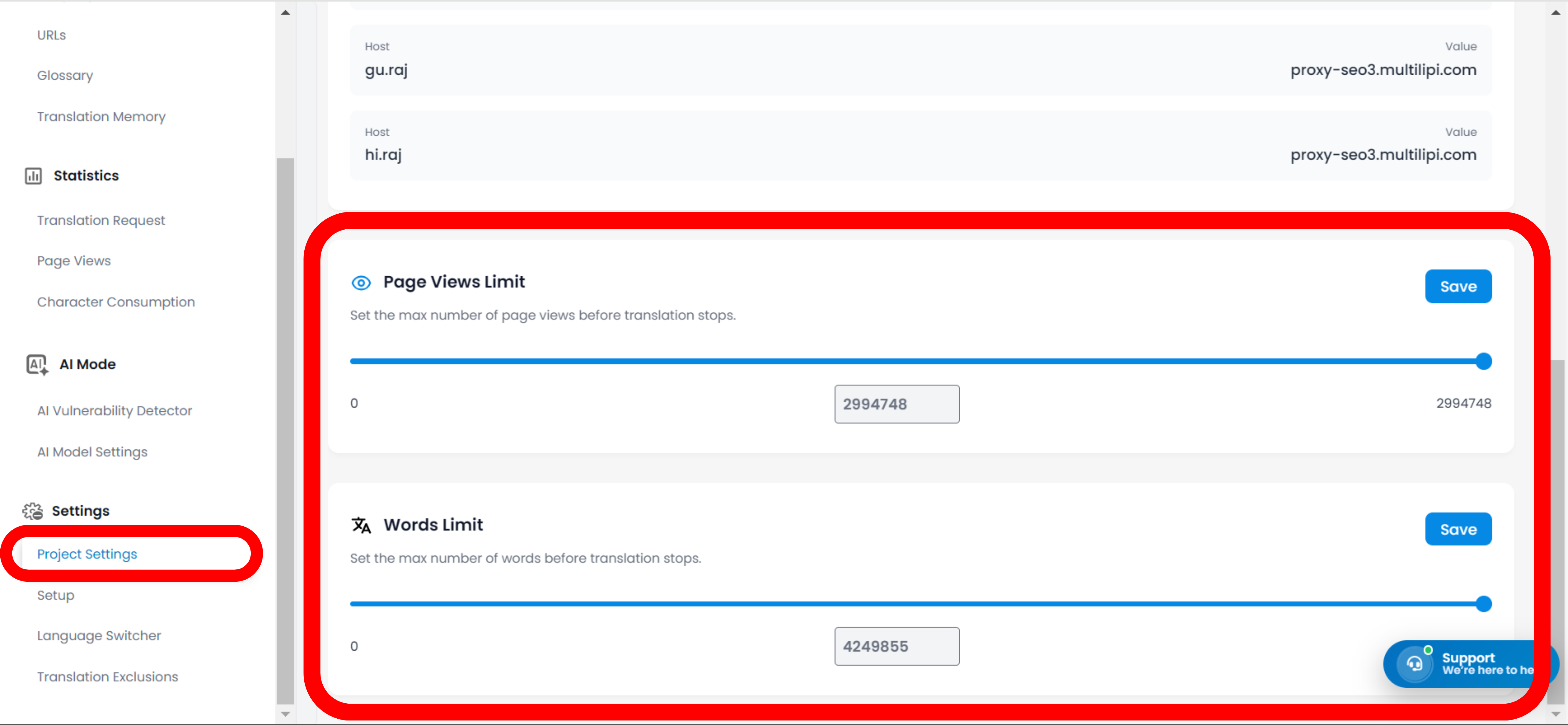
Gulir ke bawah ke bagian Batas Tampilan Halaman dan Batas Kata.
Metode A (Penggeser): Geser penggeser visual ke persentase atau nilai yang diinginkan.
Metode B (Input Presisi): Ketik bilangan bulat persis (misalnya, 25000) ke dalam kolom input untuk kontrol yang terperinci.
Langkah 3: Menerapkan Kebijakan
Klik tombol Simpan untuk mengaktifkan aturan secara langsung.
Catatan Operasional:
Anda dapat mengklik Atur Ulang kapan saja untuk menghapus batas kustom ini dan kembali ke kapasitas maksimum paket Anda secara default.
3. Strategi Implementasi Strategis
Kapan menggunakan batas ini.
Strategi "Penguncian Anggaran": Jika paket Anda mencakup 100.000 tampilan halaman, tetapkan Batas Tampilan Halaman Anda ke 95.000. Ini memberi Anda "penyangga peringatan" sebelum Anda mencapai batas maksimum langganan Anda.
Strategi "Peluncuran Bertahap": Saat meluncurkan situs berskala besar (misal: 5.000 halaman), tetapkan Batas Kata yang rendah terlebih dahulu. Navigasikan ke halaman prioritas tinggi Anda (Beranda, Harga, Kontak) untuk menerjemahkannya terlebih dahulu. Setelah diverifikasi, tingkatkan batas untuk menerjemahkan sisanya. Ini memastikan kuota Anda tidak terbuang percuma untuk tautan footer bernilai rendah atau postingan yang diarsipkan secara langsung.
Strategi "Mode Krisis": Jika Anda mendeteksi serangan bot atau lalu lintas spam, segera turunkan Batas Tampilan Halaman untuk menjeda layanan terjemahan dan melindungi kredit yang tersisa saat Anda memblokir IP berbahaya tersebut.