

Ekspansi ke pasar baru membutuhkan lebih dari sekadar terjemahan; ini membutuhkan struktur URL, pengindeksan SEO, dan jaringan pengiriman konten. MultiLipi menyederhanakan kompleksitas ini, memungkinkan Anda untuk meluncurkan (atau menghentikan) seluruh endpoint bahasa secara instan dari dasbor Anda.
Panduan ini mencakup siklus hidup suatu bahasa: Penyediaan, Konfigurasi (Font/RTL), dan Penghentian.
Penyediaan Pasar Satu Klik
Berbeda dengan plugin terjemahan tradisional yang memerlukan konfigurasi manual untuk setiap bahasa baru, MultiLipi secara otomatis menyediakan semua infrastruktur yang diperlukan: sub-direktori atau sub-domain, tag hreflang, entri sitemap XML, dan metadata terlokalisasi—semuanya dengan satu klik.
1. Penyediaan (Menambah Bahasa)
Luncurkan pasar baru dalam hitungan detik.
Saat Anda menambahkan bahasa, MultiLipi segera menyediakan subdirektori (misalnya, /de/) atau sub-domain (misalnya, de.site.com) dan memicu Neural Translation Engine untuk mulai mengindeks konten Anda.
Protokol Penerapan
Akses Infrastruktur
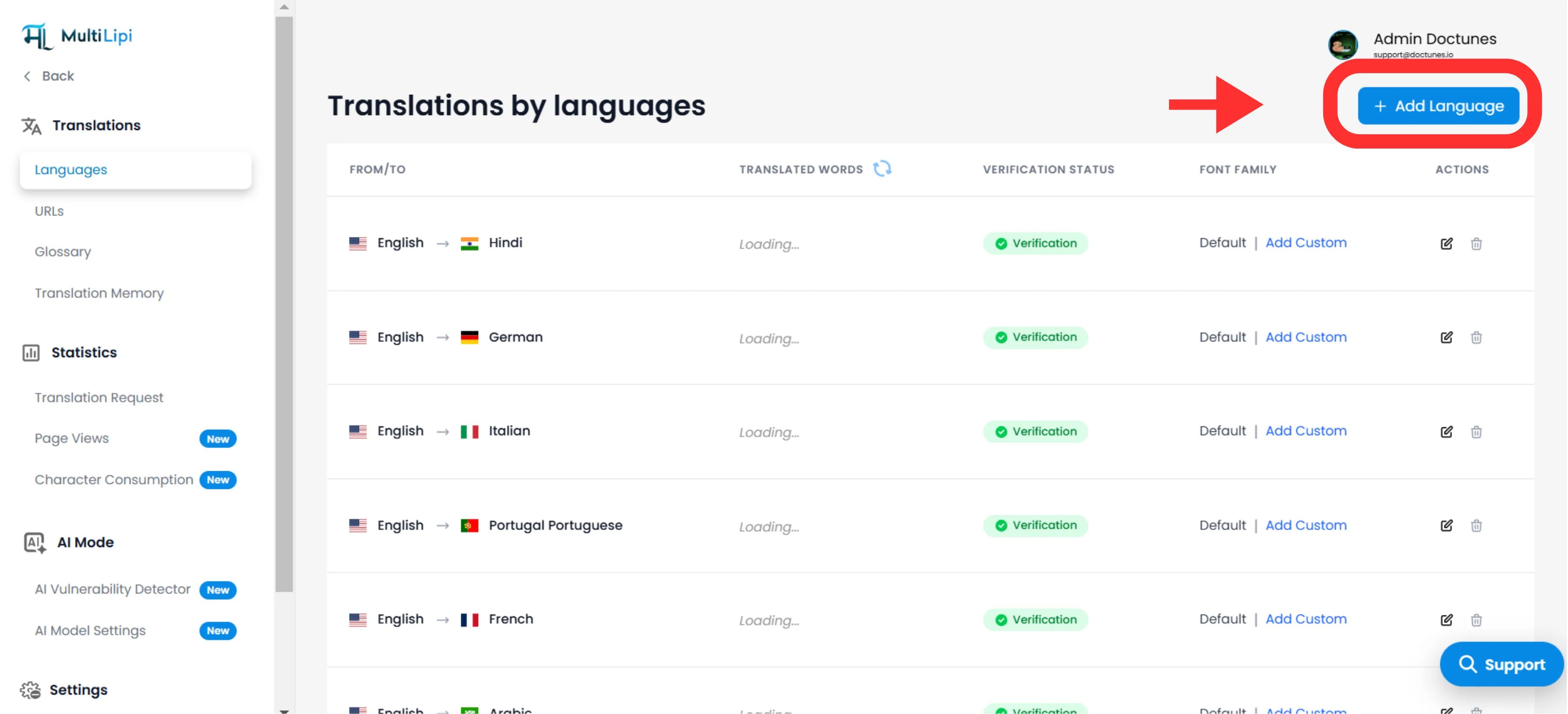
Arahkan ke Terjemahan > Bahasa di bilah sisi dasbor Anda.
Mulai Penerapan
Klik Tambah Bahasa di pojok kanan atas.
Pilih Lokal
Pilih dari 100+ bahasa yang didukung.
Catatan Strategis
Jadilah spesifik. Memilih Spanyol (Meksiko) vs. Spanyol (Spanyol) akan mengubah tag hreflang dan penargetan SEO Anda.
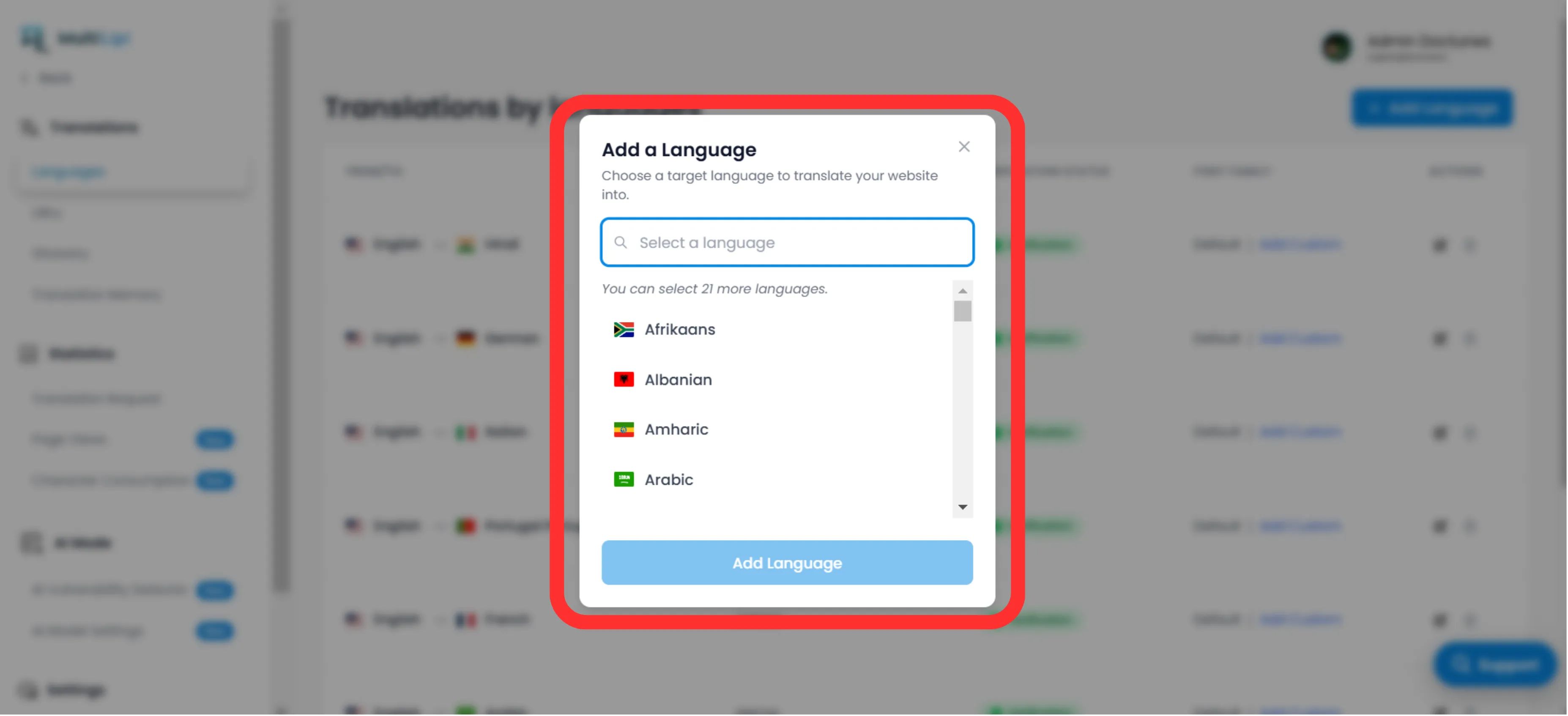
Eksekusi
Klik Tambah. Titik akhir sekarang aktif, dan pengindeksan dimulai segera.
2. Konfigurasi & Lokalisasi
Pastikan keterbacaan di seluruh skrip.
Menerapkan bahasa hanyalah langkah pertama. Anda harus memastikan skrip dirender dengan benar untuk pengguna lokal.
Tipografi (Keluarga Font)
Bahasa yang berbeda memerlukan bobot visual yang berbeda. Di Grid Bahasa, gunakan kolom "Keluarga Font" untuk menetapkan font web tertentu.
Contoh
Gunakan 'Noto Sans JP' untuk bahasa Jepang demi memastikan definisi karakter yang jelas, sambil mempertahankan 'Inter' untuk bahasa Inggris.
Gaya Penulisan (Dukungan RTL)
Untuk pasar seperti Timur Tengah (Arab, Ibrani, Farsi), MultiLipi secara otomatis mendeteksi lokal dan membalik tata letak CSS Anda ke Kanan ke Kiri (RTL)Tidak diperlukan pengodean manual.
Deteksi Otomatis: Saat Anda menambahkan bahasa Arab, Ibrani, atau Farsi, sistem secara otomatis menerapkan dir="rtl" untuk memastikan aliran teks dan pencerminan tata letak yang tepat.
3. Penghentian (Menghapus Bahasa)
Hentikan pasar yang berkinerja buruk secara efektif.
Jika suatu wilayah tidak lagi strategis, atau Anda perlu mengklaim kembali kuota terjemahan, Anda dapat menonaktifkan bahasa tersebut.
Temukan Titik Akhir
Dalam Bahasa panel, temukan baris target.
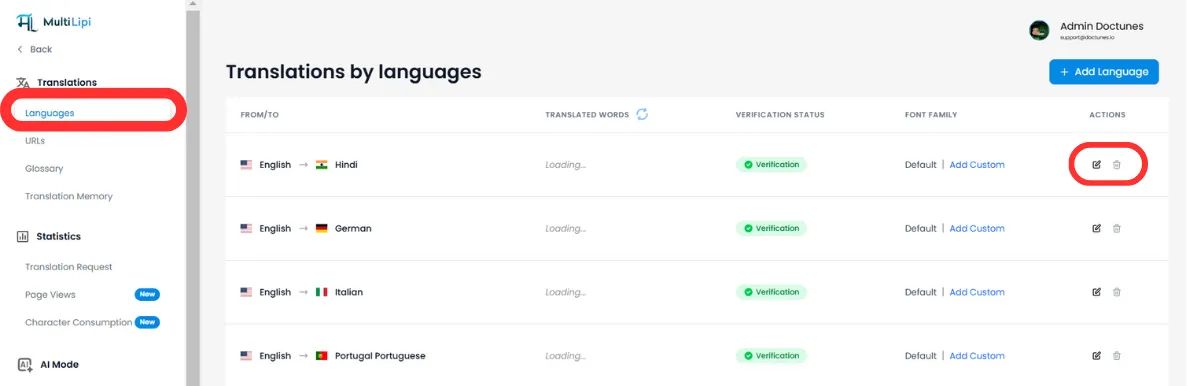
Lakukan Penghapusan
Klik Ikon Sampah/Hapus di kolom Tindakan.
Konfirmasi
⚠️ Peringatan Penting
Menghapus bahasa segera menghentikan titik akhirLalu lintas apa pun ke /fr/ (misalnya) akan menghasilkan Kesalahan 404. Jika bahasa ini memiliki halaman yang terindeks, kami menyarankan untuk menyiapkan Pengalihan 301 di tingkat server Anda sebelum penghapusan.
Ringkasan: Dampak Infrastruktur
| Tindakan | Dampak SEO | Dampak Kuota |
|---|---|---|
Tambah Bahasa | Menghasilkan baru tag hreflang & entri peta situs XML. | Mengonsumsi kuota saat halaman dikunjungi dan diindeks. |
Hapus Bahasa | URL akan dihapus indeksnya oleh Google seiring waktu. | Mengosongkan kuota untuk terjemahan di masa mendatang. |
🌍 Manajemen Bahasa Strategis: Tidak seperti kompetitor yang memerlukan penyiapan infrastruktur manual untuk setiap bahasa baru, penyediaan satu-klik MultiLipi memungkinkan Anda menguji pasar baru dengan cepat dan berporos secara instan berdasarkan data kinerja, tanpa beban teknis.