

Teks hanyalah setengah cerita. Untuk mencapai imersi penuh, aset visual Anda juga harus berbicara dalam bahasa lokal. Infrastruktur MultiLipi memungkinkan Anda melakukan Penukaran Aset di edge. Anda dapat mengganti URL sumber (src) dan metadata (alt) gambar apa pun berdasarkan bahasa pengguna.
Skenario A (Teks-dalam-Gambar): Tukar spanduk "Summer Sale" bahasa Inggris dengan spanduk "Soldes d'été" bahasa Prancis.
Skenario B (Relevansi Budaya): Tampilkan gambar kriket untuk pengguna di India dan gambar sepak bola untuk pengguna di Brasil.
Skenario C (SEO): Terjemahkan tag alt yang tidak terlihat untuk memastikan gambar Anda mendapat peringkat di Google Images untuk kata kunci lokal.
Panduan ini merinci protokol untuk menukar aset menggunakan Editor Visual.
1. Protokol Penukaran
Cara menyuntikkan media yang dilokalkan.
Proses ini dilakukan sepenuhnya di dalam Editor Visual kami, sebuah antarmuka "What You See Is What You Get" (WYSIWYG) yang melapisi situs Anda yang sedang tayang.
Langkah 1: Akses Konteks Proyek
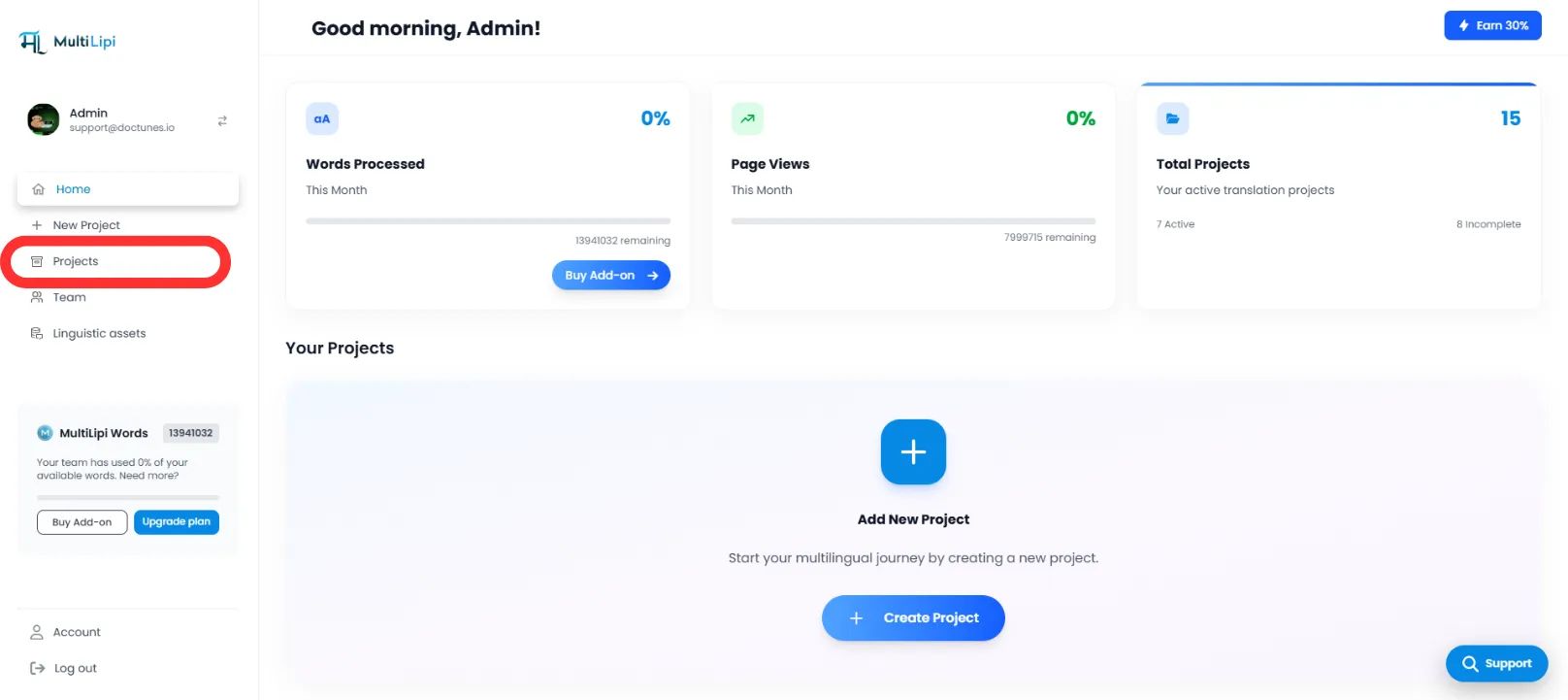
- •Masuk ke Dasbor MultiLipi Anda.
- •Arahkan ke bagian Proyek dari beranda.
- •Pilih proyek situs web spesifik yang ingin Anda modifikasi.
Langkah 2: Inisialisasi Editor
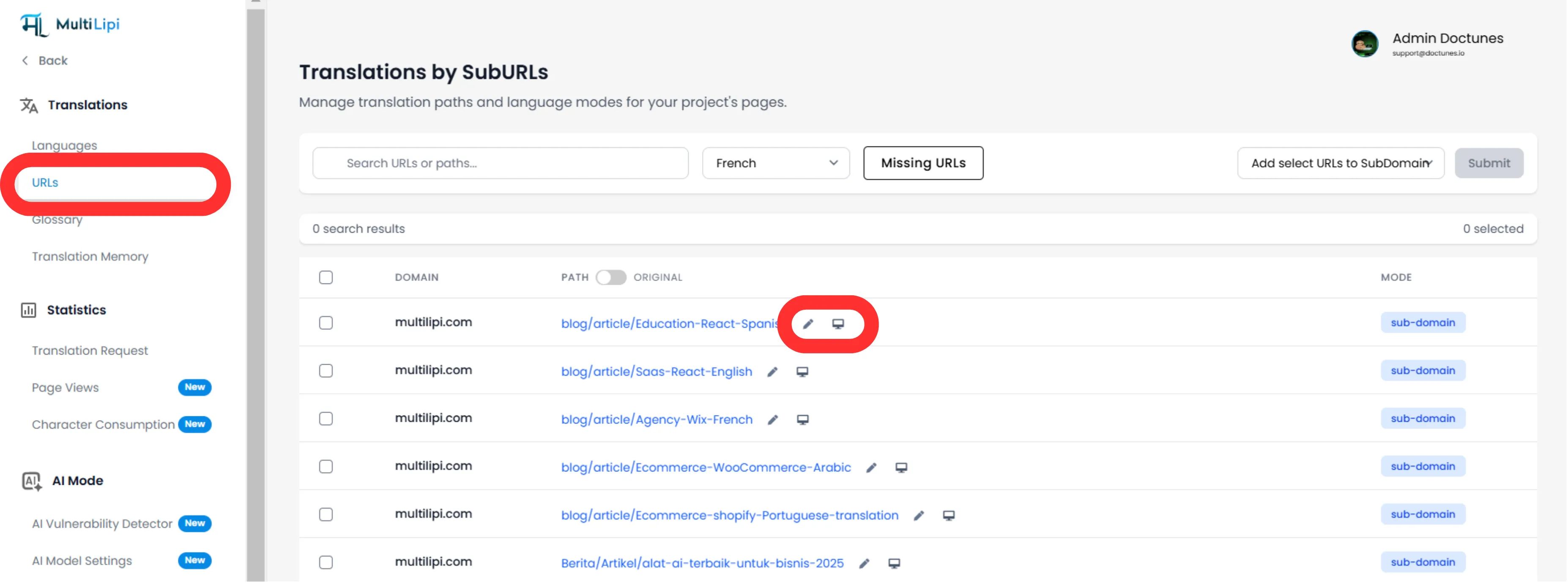
- •Arahkan ke tab Terjemahan.
- •Temukan URL halaman spesifik (misalnya, /pricing) tempat gambar berada.
- •Tindakan: Di sisi kanan, klik tombol Editor Virtual (atau ikon 🖊️).
- •Tindakan Sistem: Ini meluncurkan pratinjau langsung yang dapat diedit dari situs web Anda di jendela baru.
Langkah 3: Lakukan Penukaran Aset
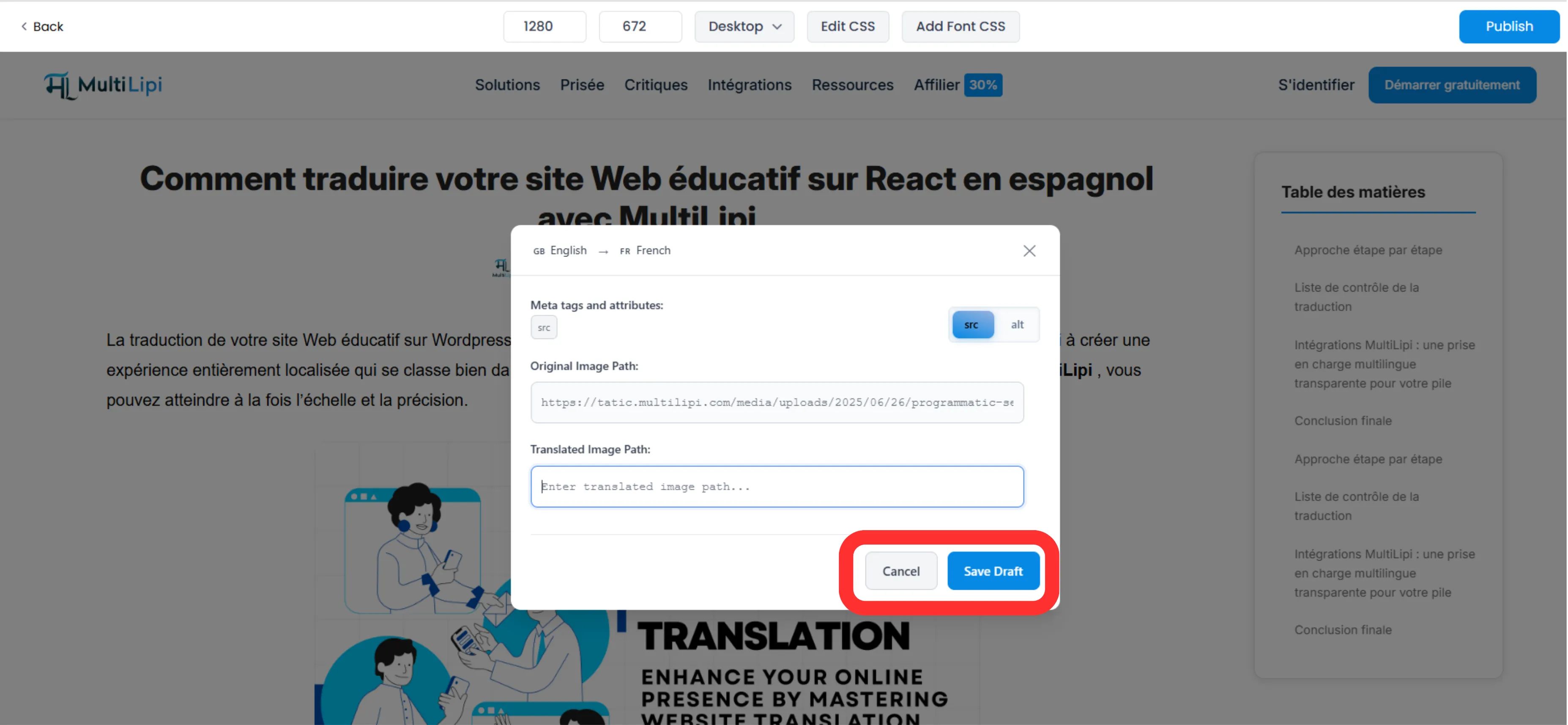
- •Pilih: Di pratinjau langsung, klik langsung pada gambar yang ingin Anda lokalkan.
- •Konfigurasi: Sebuah modal pop-up akan muncul dengan dua bidang yang dapat diedit:
src Gambar Terjemahan:
Tempelkan URL lengkap file gambar baru (di-host di CDN/Server Anda).
Tag alt terjemahan:
Masukkan deskripsi terjemahan untuk aksesibilitas dan SEO.
- •Ulangi: Anda dapat melakukan tindakan ini untuk setiap elemen gambar di halaman.
Langkah 4: Terapkan Perubahan
Setelah penggantian dikonfigurasi, klik Simpan Draf di bilah alat editor.
Hasil:
Perubahan disimpan. Ketika pengguna mengunjungi halaman yang diterjemahkan, mesin kami secara dinamis menukar atribut src HTML untuk memuat gambar baru Anda.
2. Manfaat Strategis
Mengapa repot-repot menerjemahkan gambar?
SEO Visual: Mesin pencari merayapi teks alt. Jika halaman bahasa Spanyol Anda memiliki tag alt bahasa Inggris, Anda kehilangan lalu lintas. Melokalkannya membantu Anda mendapatkan peringkat untuk pencarian gambar bahasa Spanyol.
Tingkat Konversi: Pengguna mengabaikan banner yang tidak dapat mereka baca. Menerjemahkan teks yang disematkan dalam gambar promosi secara drastis meningkatkan rasio klik tayang.
Aksesibilitas: Pembaca layar mengandalkan teks alt. Melokalkan ini memastikan pengguna tunanetra atau rabun jauh di negara lain dapat menavigasi situs Anda secara efektif.
3. Praktik Terbaik
Hosting CDN: MultiLipi tidak menghosting file gambar Anda. Anda harus mengunggah gambar terlokalisasi Anda (misalnya, banner-fr.jpg) ke server Anda sendiri atau pustaka media (WordPress Media / Shopify Files) dan menyalin URL tersebut ke bidang "Translated Image src".
Panjang Teks Alt: Jaga agar teks alt terjemahan Anda ringkas (di bawah 100 karakter) untuk memaksimalkan dampak SEO tanpa ditandai sebagai "penimbunan kata kunci".