

"Pengalih Bahasa" adalah jembatan pengguna ke infrastruktur terlokalisasi Anda. MultiLipi mendukung dua metode injeksi yang berbeda untuk menyeimbangkan kemudahan penerapan dengan integritas desain. Anda dapat menerapkannya sebagai Lapisan Mengambang Persisten (terbaik untuk peluncuran cepat) atau sebagai Elemen Tertanam yang Terintegrasi Penuh (terbaik untuk desain kustom).
Panduan ini merinci langkah-langkah navigasi dan perbedaan teknis antara kedua strategi tersebut.
1. Protokol Navigasi (Navigasi)
Mengakses kontrol antarmuka.
Untuk mengonfigurasi strategi penentuan posisi, ikuti jalur ini di pusat komando Anda:
Langkah 1: Akses Dasbor
Masuk ke akun MultiLipi Anda untuk mengakses tampilan Beranda.
Langkah 2: Pilih Proyek
Klik pada Ubin Proyek tertentu untuk situs web yang ingin Anda konfigurasikan.
Langkah 3: Akses Pengaturan
Di bilah sisi kiri, klik Pengaturan.
Langkah 4: Temukan Modul
Dari submenu atau daftar pengaturan, pilih Pengalih Bahasa.
Tindakan:
Di sini Anda akan melihat opsi untuk beralih antara mode Mengambang dan Tertanam.
2. Pengalih Mengambang (Mode Overlay)
Penerapan cepat melalui injeksi JS.
Apa itu?
Pengalih Mengambang adalah widget otonom yang disuntikkan ke DOM melalui JavaScript. Ia berada pada sumbu Z di atas konten situs web Anda, tertambat ke sudut viewport.
Pemosisian: Dapat dikonfigurasi ke salah satu dari empat kuadran:
- •Kiri Bawah (Default) / Kanan Bawah
- •Kiri Atas / Kanan Atas
Keunggulan Arsitektural:
- •Tanpa Kode: Tidak perlu pengeditan HTML. Bekerja secara instan setelah skrip disuntikkan.
- •Kompatibilitas Universal: Dijamin untuk dirender di platform apa pun (WordPress, Shopify, Webflow) tanpa merusak alur tata letak.
- •Responsif Seluler: Otomatis menskalakan dan memposisikan ulang untuk viewport yang lebih kecil.
Ideal untuk: Tim yang membutuhkan solusi "Plug-and-Play" tanpa melibatkan pengembang frontend.
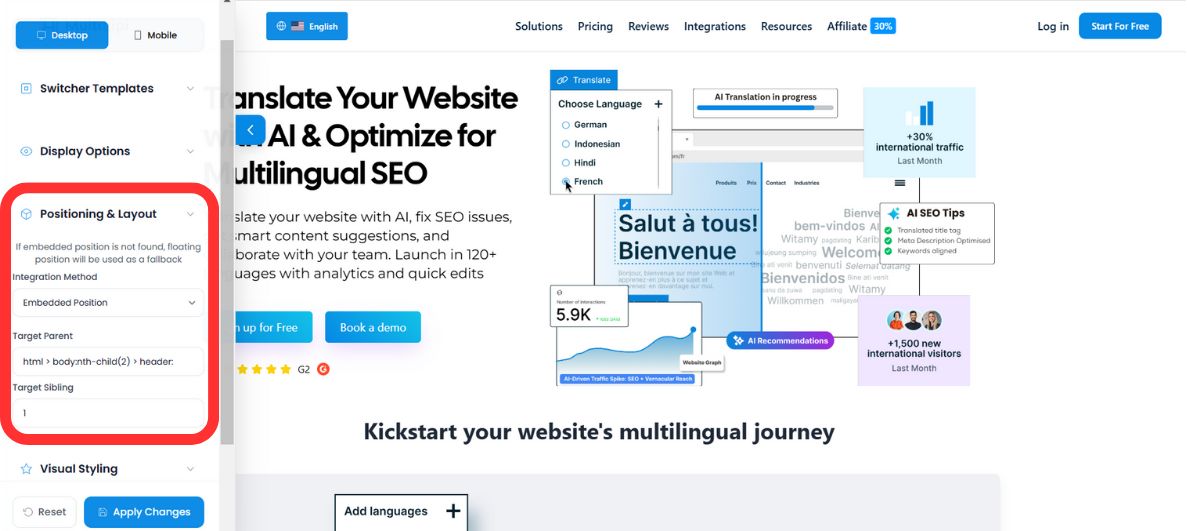
3. Pengalih Tertanam (Mode Integrasi)
Penyisipan DOM yang mulus.
Apa itu?
Embedded Switcher memungkinkan Anda untuk menyisipkan pengalih bahasa langsung ke dalam wadah tertentu dalam struktur HTML Anda, seperti Bilah Navigasi (
Mekanismenya: Anda menyediakan Pemilih CSS tertentu (ID atau Kelas) di dasbor MultiLipi.
Contoh Input: #menu-language-item atau .navbar-right.
Tindakan: Skrip kami memindai DOM untuk pemilih tertentu itu dan merender pengalih di dalam elemen tersebut, mewarisi batasan tata letak induknya.
Ideal untuk: Desainer yang membutuhkan kontrol piksel-sempurna dan ingin pengalih terasa seperti bagian asli dari sistem menu UI.
4. Protokol Failover (Logika Keamanan)
Memastikan ketersediaan antarmuka.
Dalam lingkungan web dinamis, ID dan Kelas dapat berubah. Apa yang terjadi jika Anda menerapkan Pengalih Tertanam yang menargetkan #nav-lang, tetapi pengembang Anda secara tidak sengaja mengganti nama ID tersebut menjadi #nav-menu?
MultiLipi menjalankan Failover Otomatis:
- •Pindai: Skrip mencoba menemukan pemilih CSS target.
- •Kegagalan: Jika target tidak ditemukan (null), skrip menandai kesalahan.
- •Pemulihan: Otomatis kembali ke Mode Mengambang.
- •Hasil: Pengalih muncul di posisi mengambang default (misalnya, Kanan-Bawah), memastikan pengguna masih dapat mengubah bahasa, bahkan jika tata letak rusak.
- •Debugging: Peringatan konsol dicatat agar pengembang Anda memperbaiki pemilih.