
Model terjemahan AI sangat kuat, tetapi bisa jadi terlalu kreatif. Glosarium berfungsi sebagai "Guardrail Layer," memaksa mesin terjemahan untuk mematuhi aturan merek spesifik Anda. Baik itu memastikan "Apple" tetap menjadi nama merek (dan bukan buah) atau menjaga penafian hukum secara verbatim, maka Manajer Glosarium MultiLipi memberi Anda kendali penuh.
Panduan ini mencakup dua metode untuk mendefinisikan aturan ini: Entri Manual (Presisi) dan Ingesti CSV (Massal).
Tegakkan Konsistensi Istilah yang Ketat
Glosarium mengesampingkan keputusan terjemahan AI untuk menjaga integritas merek. Gunakan untuk nama perusahaan, SKU produk, istilah hukum, jargon teknis, dan kata kunci SEO bernilai tinggi yang harus tetap konsisten di semua bahasa.
Mengakses Basis Istilah
Glosarium adalah pengaturan global yang berlaku di semua proyek Anda.
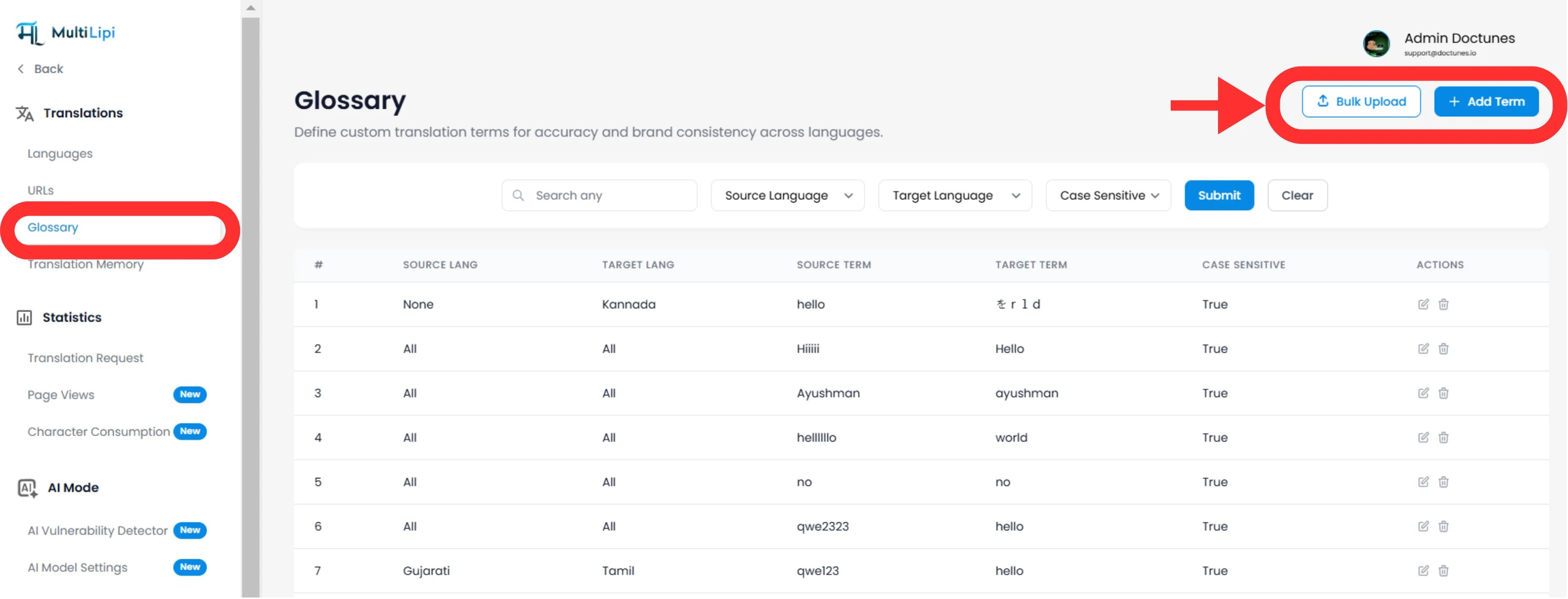
Navigasi: Dari Dasbor MultiLipi Anda, perluas Terjemahan menu di bilah sisi.
Pilih: Klik Glosarium.
Lihat: Anda akan melihat tabel yang dapat dicari dari semua aturan aktif, pasangan bahasa mereka, dan status sensitivitas huruf.
Metode 1: Definisi Aturan Presisi (Manual)
Terbaik untuk:
Mengunci nama merek, SKU produk, dan slogan pemasaran tertentu.
Mulai
Klik Baru tombol di sudut kanan atas.
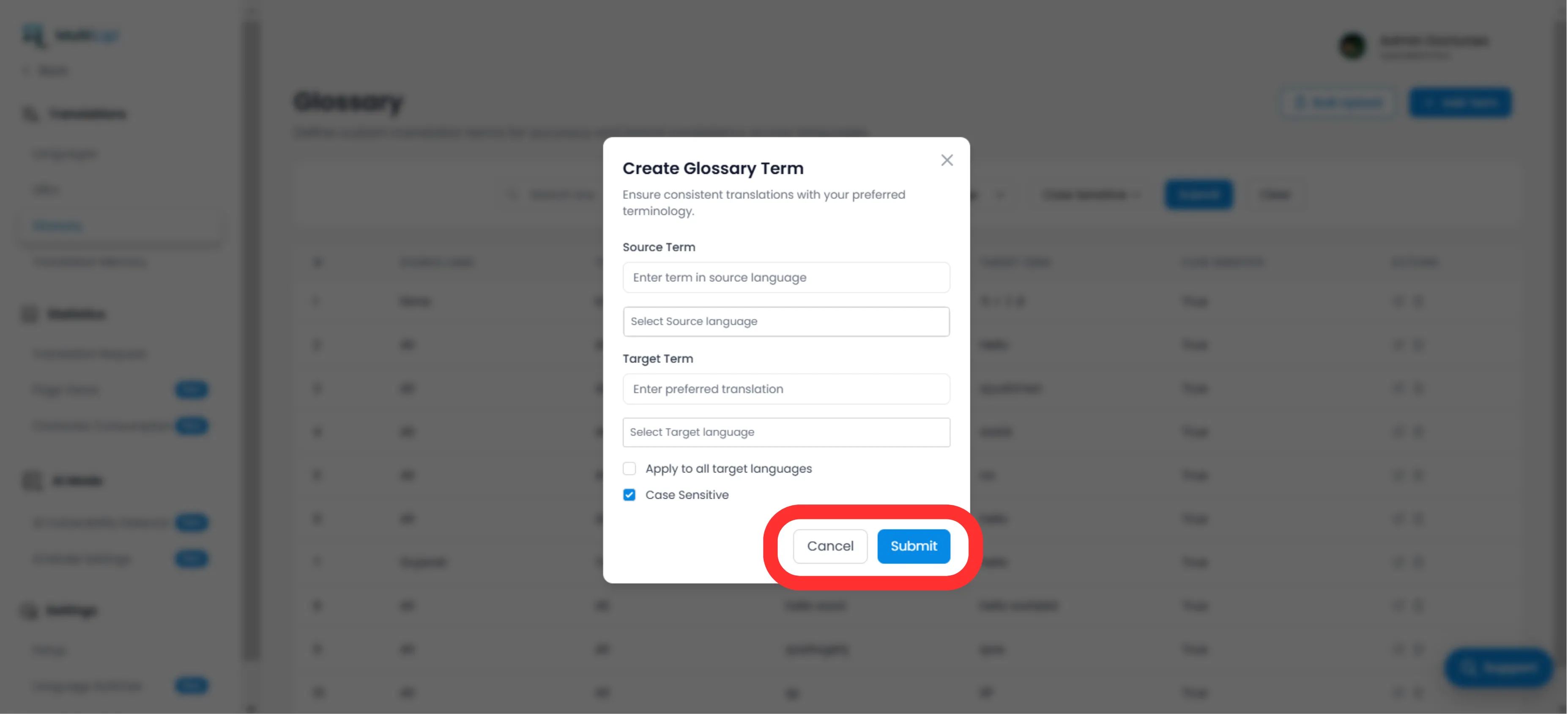
Definisikan Aturan
Istilah Sumber
Kata atau frasa yang tepat dalam bahasa asli Anda (misalnya, "CloudDrive").
Target Istilah
Terjemahan yang diwajibkan (misalnya, "CloudDrive" - untuk tetap dalam bahasa Inggris, atau "Le CloudDrive").
Cakupan Bahasa
Spesifik
Terapkan hanya untuk EN → FR.
Global
Pilih "Semua Bahasa" untuk mengunci nama merek di seluruh dunia.
Sensitivitas Huruf
Diaktifkan
Kecocokan "Apple" tetapi mengabaikan "apple". Penting untuk kata-kata umum yang juga merupakan nama diri.
Terapkan
Klik Kirim. Aturannya adalah langsung didorong ke mesin terjemahan dan akan berlaku untuk semua terjemahan di masa mendatang.
Metode 2: Ingesti Massal (Unggah CSV)
Terbaik untuk:
Memigrasikan basis istilah lama, kamus hukum, atau daftar produk e-niaga.
Jika Anda memiliki ratusan istilah, jangan memasukkannya secara manual. Gunakan alat impor CSV.
Siapkan Data Anda
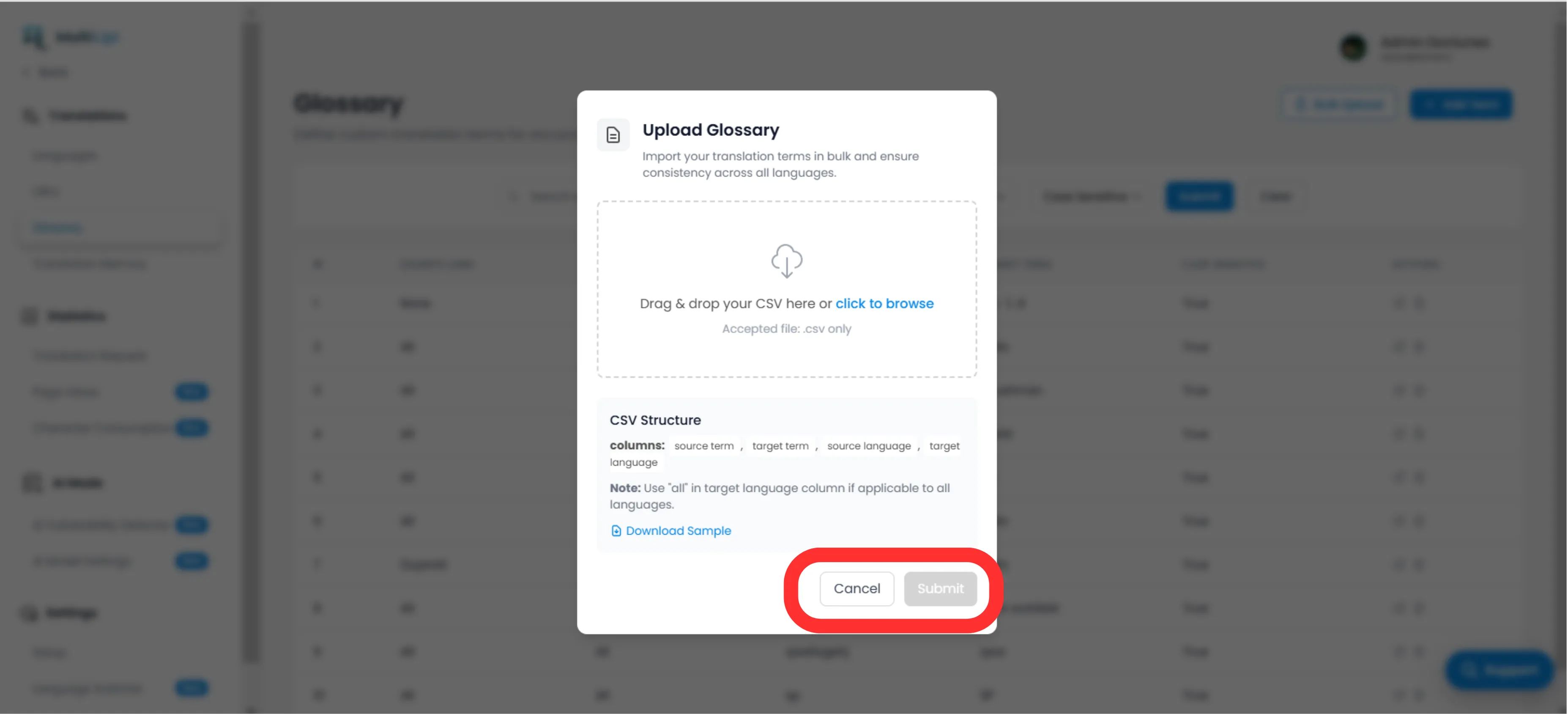
Buat file CSV dengan struktur header berikut:
source_term, target_term, source_language, target_languageCatatan
Gunakan kode ISO untuk bahasa (misalnya, en, fr, de). Gunakan semua untuk aturan global.
Unggah
Klik Unggah tombol di panel Glosarium.
Petakan & Validasi
Pilih file Anda. Sistem akan mem-parsing baris dan tandai kesalahan pemformatan apa pun.
Eksekusi
Klik Kirim untuk memasukkan aturan ke dalam Basis Istilah aktif Anda.
Praktik Terbaik Strategis
Kunci Merek Anda
Aturan pertama yang harus Anda buat adalah untuk Nama Perusahaan. Atur targetnya menjadi identik dengan sumbernya dan terapkan ke Semua Bahasa.
Kata Kunci SEO
Jika Anda menargetkan kata kunci bervolume tinggi di Jerman (misalnya, "Handy" alih-alih "Mobiltelefon"), buat aturan glosarium untuk memaksa mesin menggunakan istilah dengan lalu lintas lebih tinggi.
Buat Singkat
Glosarium paling efektif untuk frasa 1-3 kata. Jangan gunakan untuk seluruh kalimat; gunakan Memori Terjemahan or Editor Visual untuk itu.
Siap untuk menegakkan konsistensi merek? Buka Pengelola Glosarium dan mulailah mendefinisikan guardrail terjemahan Anda hari ini.