
Tidak setiap piksel situs web Anda memerlukan lokalisasi. Penafian hukum sering kali perlu tetap dalam bahasa yurisdiksi aslinya; cuplikan kode harus tetap dalam bahasa Inggris; dan rute admin tidak boleh diindeks.
MultiLipi menyediakan Sistem Pengecualian Tiga Tingkat—URL, Blok, dan Kata—memberi Anda presisi bedah atas apa yang diabaikan AI.
Tiga Tingkat Pengecualian
Sebelum mengonfigurasi aturan, pahami tingkat kontrol yang Anda butuhkan:
Tingkat Halaman (Aturan URL)
Tindakan: Sepenuhnya menonaktifkan terjemahan untuk seluruh halaman atau direktori.
Studi Kasus: Panel admin (/app/*), Pengaturan Pengguna, atau Syarat Layanan Bahasa Inggris yang "Mengikat Secara Hukum".
Tingkat Komponen (Aturan Blok)
Tindakan: Mengabaikan konten di dalam elemen HTML tertentu (div, span) berdasarkan Kelas CSS-nya.
Studi Kasus: Blok kode (), nama properti di header, atau widget pihak ketiga yang kompleks.
Tingkat Istilah (Aturan Kata)
Tindakan: Mencegah kecocokan string tertentu diproses.
Studi Kasus: Nomor model produk atau jargon teknis yang tidak dapat diterjemahkan.
Mengakses Mesin Tata Kelola
Untuk mendefinisikan logika negatif Anda:
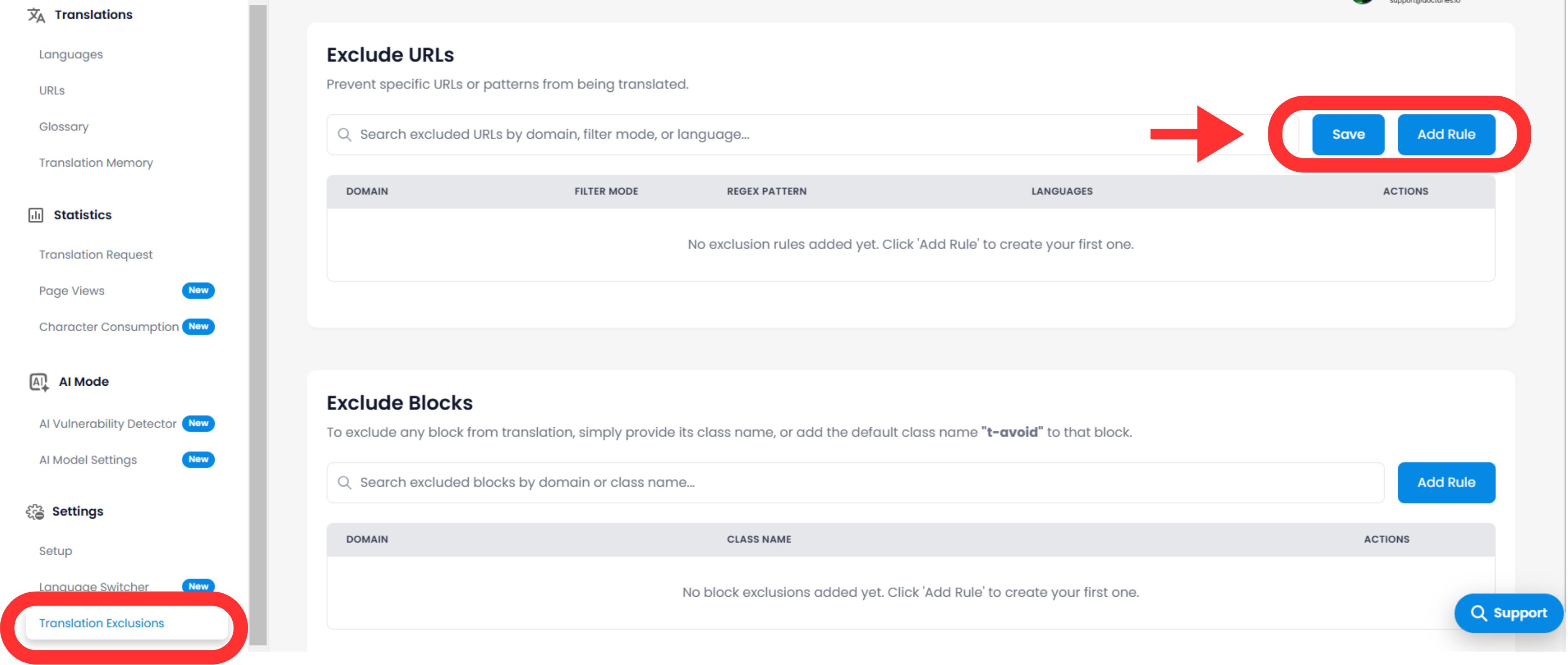
- Navigasi: Buka Dasbor MultiLipi Anda dan pilih proyek aktif Anda.
- Temukan Pengaturan: Di bilah sisi, gulir ke bawah ke Pengaturan dan pilih Pengecualian Terjemahan.
- Antarmuka: Anda akan melihat daftar aturan aktif yang dipisahkan berdasarkan kategori (URL, Blok, Kata).
Mengonfigurasi Aturan Logika
Klik Tambah Aturan tombol untuk mendefinisikan batasan baru.
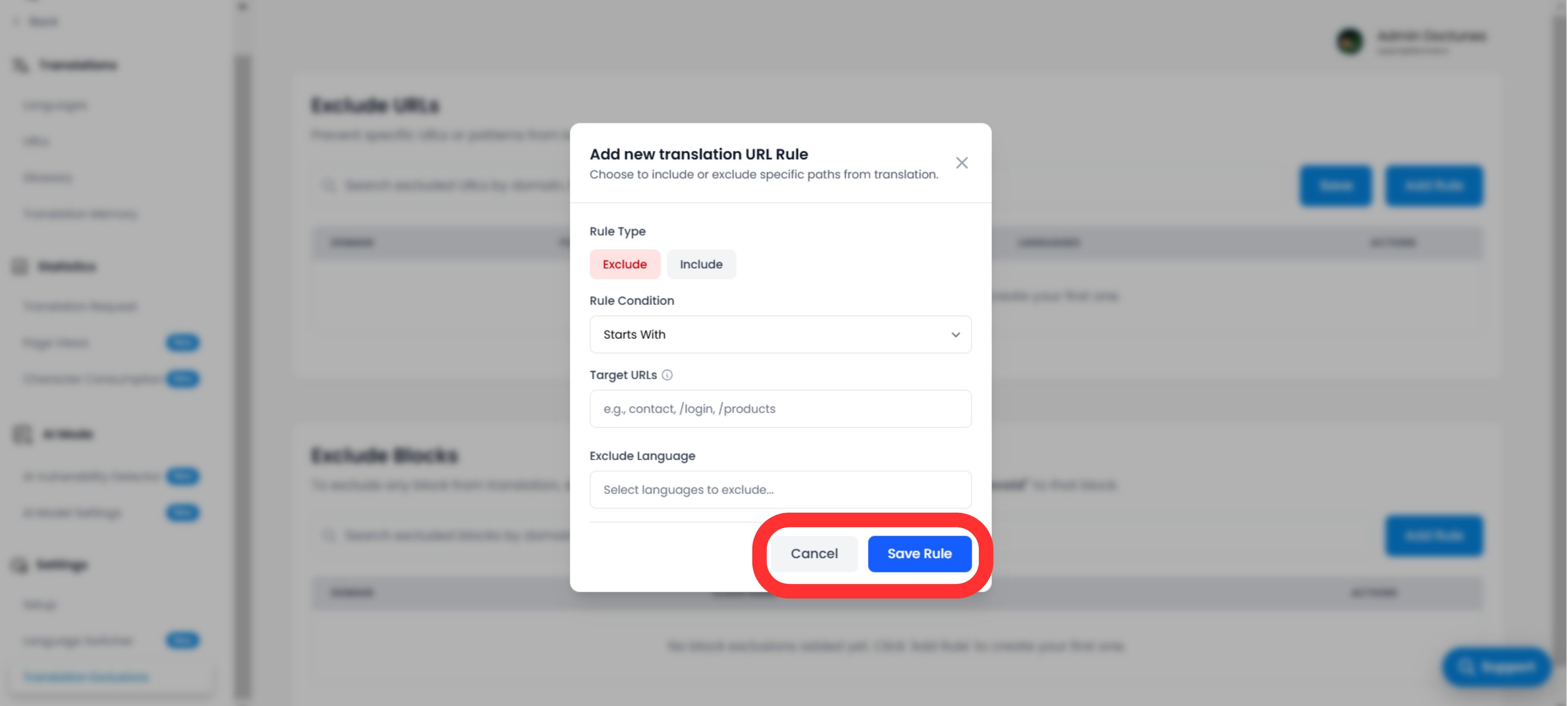
A. Mendefinisikan Pola
Anda harus memberi tahu mesin cara mencocokkan konten:
Jenis Aturan:
- •Dimulai Dengan: Terbaik untuk direktori (misalnya,
/blog/mengecualikan semua posting blog). - •Berakhir Dengan: Terbaik untuk jenis file (mis.,
.pdf). - •Berisi: Pencocokan wildcard untuk URL apa pun yang berisi string tertentu.
- •Kecocokan Tepat: Menargetkan satu halaman tertentu.
Nilai:
Masukkan jalur, nama kelas CSS (tanpa .), atau kata.
B. Lingkup & Perilaku
Bahasa:
Terapkan aturan secara global (Semua Bahasa) atau membatasinya pada lokal tertentu (misalnya, Kecualikan /pricing hanya dalam bahasa Prancis).
Visibilitas Pengalih (UX Penting)
Alihkan: "Sembunyikan Pengalih Bahasa"
Dampak: Jika Anda mengecualikan halaman (seperti layar login), Anda mungkin ingin menyembunyikan pengalih bahasa di halaman tersebut agar pengguna tidak mencoba mengganti bahasa dan tidak melihat apa pun terjadi. Pengalih ini mengotomatiskan pembersihan UX tersebut.
Eksekusi & Verifikasi
Setelah Anda mengklik Simpan Aturan:
Propagasi Segera
Aturan didorong ke jaringan tepi secara instan.
Pembersihan Cache
Kami secara otomatis membersihkan cache untuk jalur yang terpengaruh untuk memastikan versi "Belum Diterjemahkan" segera disajikan.
Kasus Penggunaan Strategis
| Jenis Aturan | Skenario | Konfigurasi |
|---|---|---|
| Aturan URL | Dasbor Pengguna: Anda ingin situs publik diterjemahkan, tetapi aplikasi yang masuk (/app/...) untuk tetap dalam bahasa Inggris. | Tipe: Dimulai Dengan Nilai: /app/ |
| Aturan Blok | Cuplikan Kode: Anda menjalankan blog dev dan ingin teks tutorial diterjemahkan, tetapi contoh kode harus tetap menjadi kode yang valid. | Tipe: Kelas CSS Nilai: code-snippet |
| Aturan URL | Hukum Regional: Syarat Layanan Anda hanya berlaku dalam Bahasa Inggris. | Tipe: Kecocokan Tepat Nilai: /terms |