
Dalam tipografi global, "Arah" sangat penting. Bahasa seperti Arab dan Ibrani dibaca dari Kanan-ke-Kiri (RTL). Jika Anda hanya menerjemahkan teks tanpa membalik tata letak, pengalaman pengguna terasa rusak (misalnya, teks sejajar ke kiri, tanda baca salah tempat).
MultiLipi Mesin RTL adalah lapisan gaya dinamis yang mendeteksi bahasa-bahasa ini dan secara otomatis "mencerminkan" CSS situs web Anda—membalik margin, padding, dan perataan teks—untuk memastikan pengalaman membaca asli tanpa mengharuskan Anda menulis satu baris kode kustom pun.
1. Protokol Deteksi
Bahasa mana yang memicu flip?
Mesin ini sadar konteks. Ini hanya mengaktifkan cermin tata letak saat pengguna memilih bahasa RTL yang ditentukan. Untuk semua bahasa lain (Inggris, Prancis, dll.), rendering Kiri-ke-Kanan (LTR) standar tetap aktif.
Bahasa RTL yang Didukung:
Arab (ar)
Ibrani (dia)
Persia / Farsi (fa)
Urdu (Anda)
2. Protokol Konfigurasi
Mengaktifkan mesin cermin.
Untuk mengaktifkan adaptasi struktural ini, ikuti jalur ini di pusat komando Anda:
Langkah 1: Akses Konteks Proyek
Masuk ke Dasbor MultiLipi Anda.
Pilih Proyek tertentu yang ingin Anda konfigurasikan.
Langkah 2: Akses Pengaturan
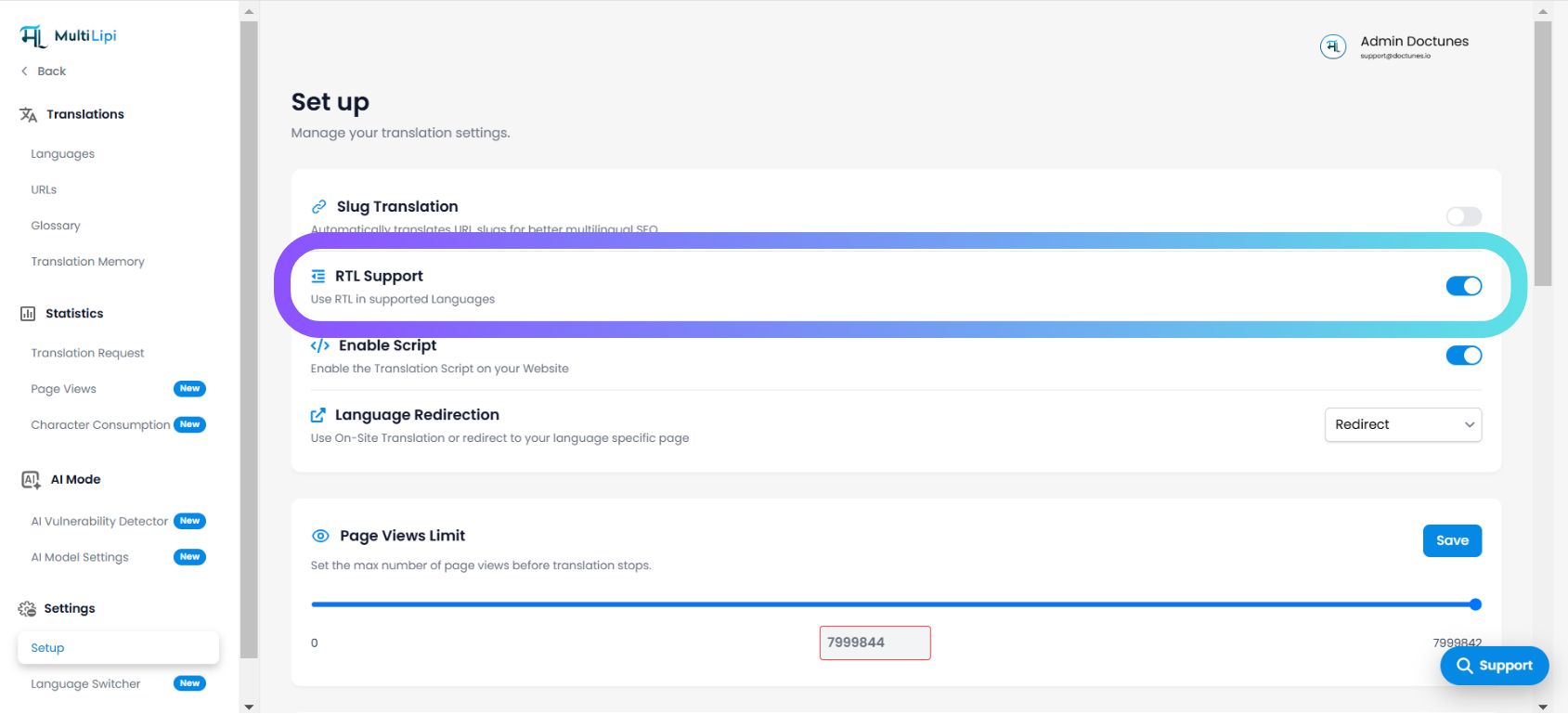
Arahkan ke Pengaturan di bilah sisi kiri.
Klik pada Setup .
Langkah 3: Beralih Mesin
Gulir untuk menemukan Dukungan RTL beralih.
Tindakan: Alihkan ke AKTIF (Biru) .
Tindakan Sistem: Lapisan injeksi CSS sekarang aktif.
3. Perilaku Teknis
Bagaimana fungsinya di browser.
Setelah diaktifkan, mesin melakukan operasi berikut secara dinamis:
Atribut Arah
Secara otomatis menyuntikkan dir="rtl" ke dalam HTML <html>saat bahasa RTL aktif.
Membalik CSS
Ini hampir "membalik" properti CSS standar.
mengapung: kiri menjadi mengambang: kanan .
margin-kiri: 10px menjadi margin-kanan: 10px .
Integrasi Pengalih
Jika Anda menggunakan MultiLipi Language Switcher, UI akan langsung membalik orientasi saat pengguna memilih bahasa Arab atau Ibrani, memberikan transisi yang mulus.
Nota: Tidak diperlukan penggantian CSS manual. Sistem menangani perhitungan geometri secara otomatis.