
Buka Lapisan Optimasi AI
Terjemahan standar mengganti kata-kata. MultiLipi Optimasi LLM merekayasa ulang konten Anda untuk era AI. Dengan mengaktifkan fitur ini, Anda mengaktifkan "Lapisan Cerdas" yang mengoptimalkan terjemahan Anda untuk Relevansi Budaya, Akurasi Kontekstual, dan Optimasi Mesin Generatif (GEO).
Fitur ini memastikan situs multibahasa Anda tidak hanya dapat dibaca oleh manusia, tetapi juga dioptimalkan secara struktural untuk ditemukan oleh agen AI seperti ChatGPT, Gemini, dan SearchGPT.
Mengaktifkan retensi konteks cerdas untuk terjemahan yang natural
Menyuntikkan sinyal skema yang dilokalkan untuk peringkat yang lebih baik
Mengaktifkan model terjemahan tingkat premium
📌 Dua Cara Mengaktifkan: Pilih berdasarkan apakah Anda menyiapkan proyek baru atau meningkatkan proyek yang sudah ada.
Metode 1: Selama Pengaturan Proyek Baru
Saat Anda menambahkan situs web baru ke MultiLipi, Anda dapat mengaktifkan Optimasi LLM langsung dalam alur orientasi untuk memastikan perayapan pertama Anda siap AI.
Mulai Alur "Tambah Proyek"
Masukkan URL situs web Anda dan lanjutkan ke Langkah 2: Konfigurasi Bahasa Anda.
Pilih Bahasa & Industri Sasaran
- Pilih bahasa yang ingin Anda terjemahkan (misalnya, Prancis, Jerman).
- Pilih spesifik Anda Industri (misalnya, SaaS, E-commerce) untuk membantu AI memahami terminologi domain Anda.
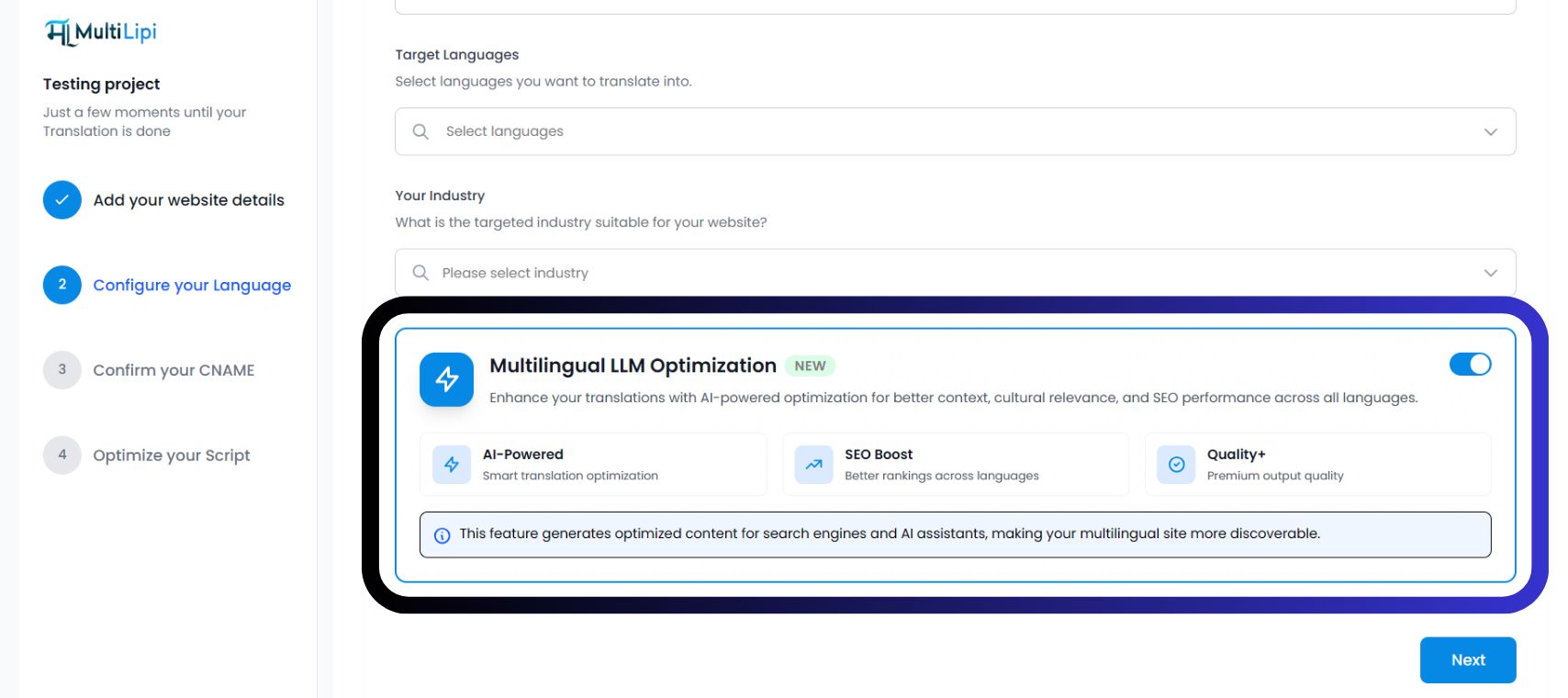
Alihkan "Optimasi LLM Multibahasa"
Temukan Kartu Optimasi Biru. Alihkan pengalih ke NYALA (Biru).
Anda akan melihat tiga lencana konfirmasi aktif:
Klik "Berikutnya"
Lanjutkan untuk mengonfirmasi CNAME Anda dan mengoptimalkan skrip Anda. Proyek Anda akan diluncurkan dengan fitur GEO aktif sejak Hari 1.
Metode 2: Untuk Proyek yang Ada
Jika Anda sudah mengintegrasikan MultiLipi, Anda dapat mengaktifkan Optimasi LLM kapan saja dari pengaturan proyek Anda.
- 1Akses Dasbor ProyekMasuk ke MultiLipi dan pilih proyek aktif Anda dari bilah sisi.
- 2Navigasi ke PengaturanDi menu sebelah kiri, klik Pengaturan dan kemudian pilih Pengaturan.
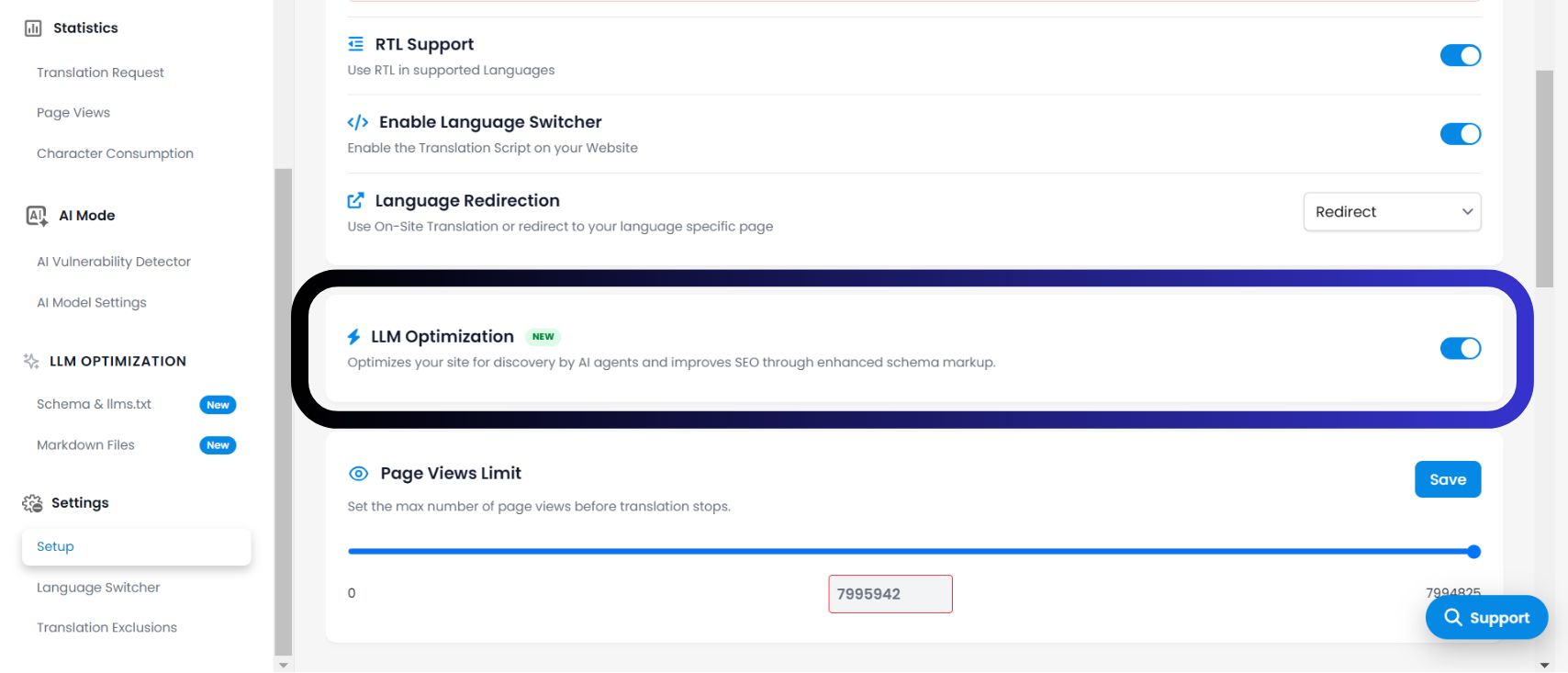
- 3Temukan Pengalih OptimasiGulir ke bawah melewati "Pengalihan Bahasa" ke Optimasi LLM bagian. Tindakan: Alihkan pengalih ke NYALA.
- 4Simpan PerubahanSistem akan segera mulai menyuntikkan sinyal yang dioptimalkan AI ke dalam lapisan terjemahan Anda. Anda sekarang akan melihat sebuah OPTIMASI LLM bagian muncul di bilah sisi Anda.
Mengapa Mengaktifkan Ini?
Menurut infrastruktur yang ditampilkan di dasbor Anda, mengaktifkan fitur ini membuka tiga keuntungan penting:
1. Konteks Berbasis AI (Terjemahan Cerdas)
Berbeda dengan terjemahan dasar, mode ini memahami "Konteks Budaya." Mode ini mengadaptasi idiom, metafora, dan nada agar sesuai dengan pasar sasaran, mencegah frasa robotik atau canggung yang merusak kepercayaan pengguna.
2. Peningkatan SEO (Peringkat Lintas Bahasa)
Ini mengoptimalkan struktur konten Anda untuk Penemuan. Ini memastikan mesin pencari (seperti Google) dan Mesin Jawaban AI (seperti Perplexity) dapat mengindeks halaman terjemahan Anda secara akurat, meningkatkan peringkat Anda di SERP lokal.
3. Kualitas+ (Output Premium)
Mode ini memaksa mesin untuk menggunakan model terjemahan kami dengan fidelitas tertinggi. Mode ini memprioritaskan akurasi dan kefasihan daripada kecepatan, memastikan suara merek Anda tetap konsisten di 100+ bahasa.
Cara Memverifikasi Aktivasi
✅ Apakah pembaruan infrastruktur sudah dilakukan?
Setelah Anda mengaktifkan Optimasi LLM tombol, antarmuka dasbor Anda akan segera berkembang. Cari indikator berikut untuk mengonfirmasi sistem aktif:
Bagian khusus berjudul OPTIMASI LLM akan muncul di bilah navigasi sisi kiri Anda.
Dalam gambaran umum proyek Anda, Anda mungkin melihat lencana "Didukung AI" atau "Peningkatan SEO" di sebelah daftar bahasa Anda.
Fitur yang Dibuka
🎁 Apa yang saya dapatkan dengan mengaktifkan ini?
Mengaktifkan fitur ini bukan hanya pengaturan; ini membuka serangkaian alat "Optimasi Mesin Generatif" canggih yang jika tidak tersembunyi. Dengan mengalihkan ini NYALA, Anda mendapatkan akses ke: