
Dalam infrastruktur global, hambatan adalah musuh konversi. Jika pengguna dari Paris mengunjungi situs Anda, mereka tidak perlu secara manual mencari ikon bendera untuk beralih ke Bahasa Prancis. MultiLipi's Pengalih Bahasa Pengunjung bertindak sebagai pengontrol lalu lintas cerdas. Ia memeriksa permintaan yang masuk Accept-Language header (lokal peramban) dan langsung mengarahkan pengguna ke versi situs Anda yang dilokalkan yang cocok (misalnya, fr.yoursite.com).
Panduan ini merinci protokol konfigurasi untuk mengaktifkan lapisan perutean otomatis ini.
1. Logika Perutean
Cara kerja deteksi.
Deteksi:
Pengguna mendarat di situsanda.com.
Inspeksi:
Mesin membaca pengaturan browser (misalnya, fr-FR).
Perutean:
Jika bahasa Prancis aktif dalam proyek Anda, sistem akan segera melakukan Pengalihan Sementara 302 ke subdomain Prancis.
Cadangan:
Jika bahasa pengguna tidak didukung, mereka tetap pada bahasa default (Sumber).
2. Protokol Konfigurasi
Aktifkan fitur ini langsung dari pusat komando proyek Anda.
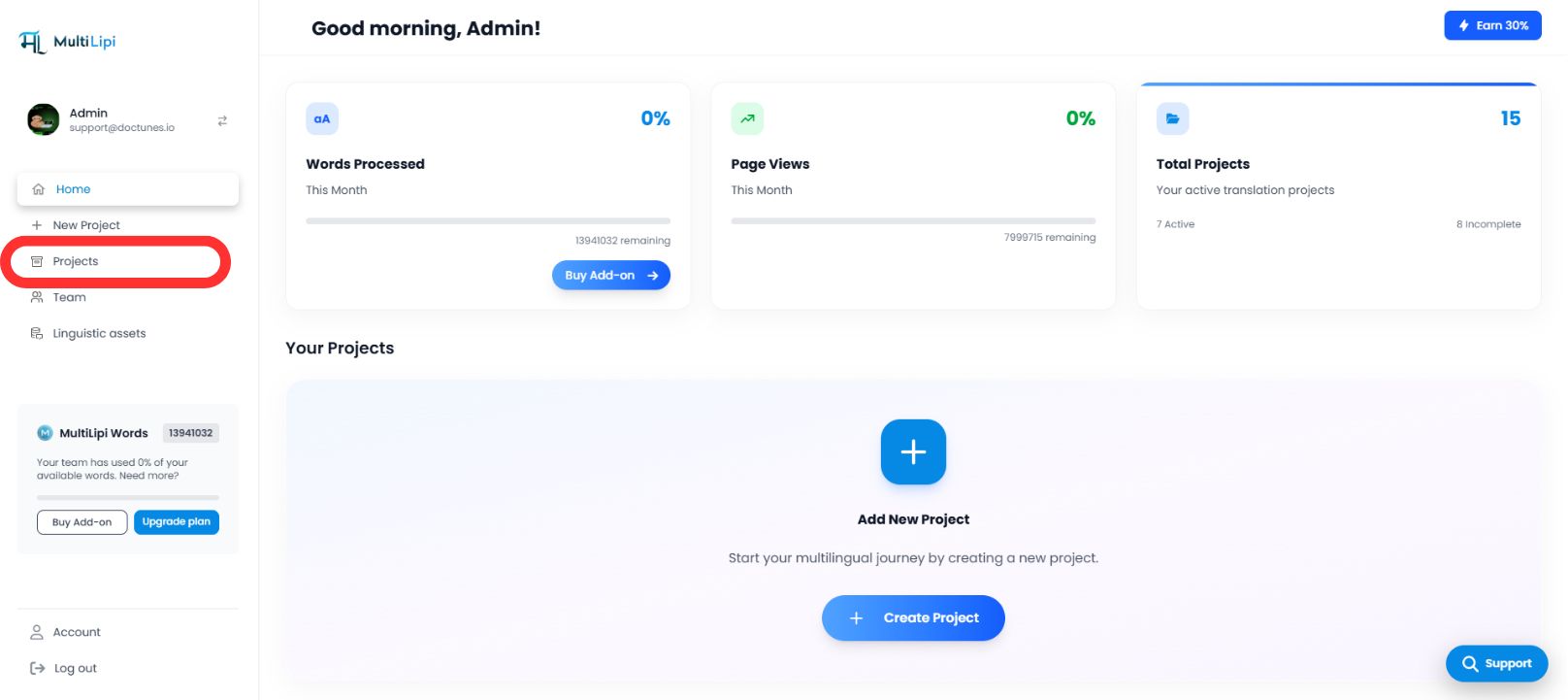
Langkah 1: Akses Dasbor Proyek
- •Masuk ke dasbor MultiLipi Anda.
- •Arahkan ke bilah sisi kiri dan klik pada Proyek untuk melihat portofolio aktif Anda.
Langkah 2: Pilih Proyek Target
- •Temukan domain spesifik yang ingin Anda konfigurasikan.
- •Klik Judul Proyek untuk masuk ke konsol manajemen spesifiknya.
Langkah 3: Akses Konfigurasi Pengaturan
- •Di bilah sisi kiri tampilan proyek, klik Pengaturan.
- •Dari menu tarik-turun atau sub-menu, pilih Pengaturan Proyek.

Langkah 4: Aktifkan Perutean
- •Gulir panel penyiapan ke bawah hingga Anda menemukan "Pengalih Bahasa Pengunjung" opsi.
- •Tindakan: Alihkan sakelar ke
NYALA. - •Respons Sistem: Mesin perutean sekarang aktif. Pengunjung baru akan secara otomatis dialihkan berdasarkan preferensi peramban mereka.
Konfigurasi Selesai – Mesin Pengalihan Aktif
3. Manfaat Strategis
Mengapa mengotomatiskan proses ini?
Pengurangan Rasio Pentalan:
Pengguna kemungkinan kecil untuk segera pergi jika mereka melihat konten dalam bahasa asli mereka dalam satu detik pertama.
Kecepatan Konversi:
Menghapus "saklar manual" langkah mempercepat perjalanan pengguna dari pendaratan ke checkout.
Pengalihan Cerdas:
Sistem ini non-intrusif; ini hanya mengalihkan jika ada terjemahan yang cocok, memastikan tidak ada pengguna yang pernah menemui jalan buntu.
Intinya:
Pengalihan bahasa otomatis mengubah situs Anda dari portal terjemahan pasif menjadi mesin lokalisasi cerdas yang mengantisipasi kebutuhan pengguna bahkan sebelum mereka mengklik.